



Estimated reading time at 200 wpm: 8 minutes
Purpose: Triage is an OpenWebUI button created de novo. It enables a cheap or free AI model to read a frontier model’s answer. Then it offers a summary and follow-up prompts in about 30 seconds. It was built to fit inside a short prompt-cache window.
Whether or not you agree our Fat Disclaimer applies
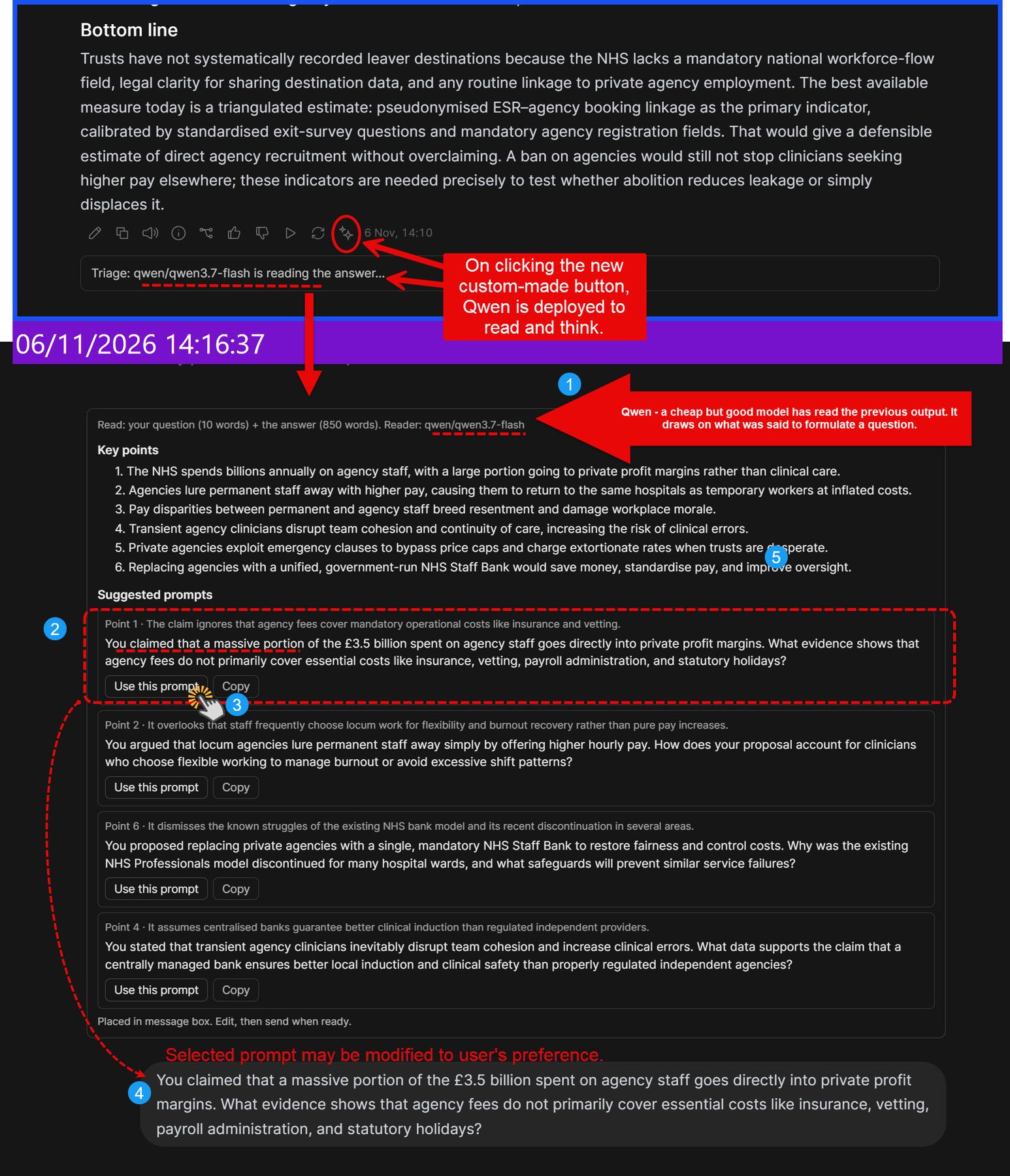
The reader is a second model studying the first model’s response. It thinks the answer through, identifies its key points and weak spots, and only then drafts prompts that challenge them. Each prompt shows the weakness it targets.
This requires advanced knowledge of OpenWebUI
This differs from OpenWebUI’s built-in Follow-Up Prompts. Those offer brief suggestions after every reply, with no summary and no reasoning shown.
The setup is OpenWebUI v0.13 in Docker, with models reached through OpenRouter. The main analytical model is Gemini 4 Argon but other frontier models may have a short cache window as well.
Missing the cache window means that the next prompt is not discounted for the previous data (all of which will be uploaded anyway).
The problem had two parts:
- Cost. OpenRouter’s documentation states that Gemini cache writes have a 5-minute time-to-live that does not refresh on reads. A follow-up sent after the cache expires reprocesses the whole thread at full input price.
- Reading time. A long Argon answer routinely takes more than 5 minutes to read, process and create a new prompt. So the cache was usually lost.
Triage addresses the reading time. A reader model distils the answer into key points and three or four challenging follow-up prompts. That leaves about 4.5 minutes to judge, edit or reject a prompt and send it while the cache still holds. The human stays the judge throughout: nothing is sent automatically.
A keep-alive script that pinged Argon every 4 minutes was considered and dropped. Because reads do not reset Gemini’s cache timer, pinging cannot extend it.
Why an Action Function
An Action Function was chosen because it is the only route that met all three requirements: it runs only when clicked, the user chooses the reader model, and its output stays out of the main thread.
The Action when created needs to be turned on Globally, else the function will not work.
| Option | Who triggers it | Does its output enter the thread? | Verdict |
| Manual model swap in the dropdown | User | Yes. The critique becomes an assistant message that Argon later reads as its own words | Rejected |
| Built-in Follow-Up Prompts | Automatic, after every response | No, but it gives no summary | Rejected. Its suggestions were shallow, and it runs whether wanted or not |
| Built-in sub-agents | The main model decides when to delegate | Yes. Results post back into the conversation | Rejected. The frontier model controls the pacing and spends tokens deciding to delegate |
| Community Sub Agent Tool | The main model calls it | Yes | Rejected, for the same reasons |
| Action Function (custom button) | User, by clicking | No | Chosen |
Two other choices followed from this:
- Reader input is the last exchange only. The reader receives the last question and answer, not the whole thread. This keeps it focused on the current argument and keeps its cost negligible.
- The reader model is a setting. It can be swapped in one place. Qwen 3.7 Flash ($0.03 per million input tokens on OpenRouter) is the current default. A free stealth model was considered and set aside for anything confidential, because its provider is anonymous and its retention period unstated.
How it works
One click starts the reader; nothing reaches Argon until the user sends a prompt of their own choosing.
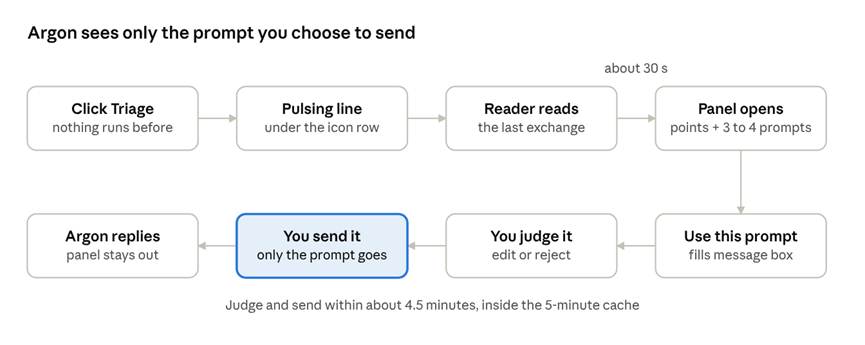
Triage flow · 8 steps, 1 click to start
If the page script cannot place the panel under the button, it appears at the top of the answer instead, with a notice.
Under the hood. The button is a Python Action Function. On a click, it runs a short page script through OpenWebUI’s execute event to show the pulsing line. It then calls OpenRouter’s chat completions endpoint with the reader instructions, the last question and the answer. A second page script builds the panel in the answer column. The panel is built from plain text only, so nothing the reader writes can run as code. Use this prompt posts OpenWebUI’s input:prompt message, which fills the message box without sending.
Settings (Valves).
| Setting | Value in dev_1.4 |
| Model | qwen/qwen3.7-flash |
| Reasoning Effort | low |
| Max Output Tokens | 8,000 (thinking included) |
| Timeout Seconds | 120 |
| Triage Prompt | Default (with a bad and a good example prompt) |
| Global | On, so the button shows under every model |
Development synopsis
Four versions were built and tested on 6 November 2026, each changing one thing that testing exposed.
| Version | What changed | Why |
| dev_1.4 | Pulsing “reading” line under the button; reader instructions with a bad and a good example prompt; any “Key point 2 argues…” opening rewritten to “You argued that…” | The status line sat out of sight at the top of the answer; prompts kept citing a numbered list the frontier model cannot see |
| dev_1.3 | Panel placed inside the answer column, after the icon row | dev_1.2 added it beside the column, squeezing the answer to one letter wide |
| dev_1.2 | Panel built by a page script under the button; text follows the page theme; prompts must restate the claim they challenge | The embedded panel appeared at the top of long answers and needed scrolling; dark grey text was unreadable on the dark theme |
| dev_1.0 | First working button: reader call, embedded panel, copy buttons | Proof of concept |
Set-up problems met along the way:
- The button appears only once the Action is set to Global, or enabled for a model.
- A stray line break in the API key gave “401: User not found”.
- Qwen’s hidden thinking used the whole 1,500-token cap, so its reply was empty. The cap was raised to 8,000.
Testing of dev_1.4
dev_1.4 passed end to end on Argon: Triage cost about 3% of one Argon turn, and Argon’s next input carried the conversation plus the sent prompt, with nothing from the panel.
Method. A fresh Argon chat was sent “Make the case that the NHS should abolish locum agencies.” Triage was clicked, one suggested prompt was placed in the message box with Use this prompt, and it was sent. Token counts and costs come from the OpenRouter activity log. A control chat without Triage ran first.
| Time | Call | Input tokens | Output tokens | Cost (USD) | Duration |
| 15:21 | Argon, turn 2 (sent the suggested prompt) | 1,212 | 1,179 | 0.0142 | 28.6 s |
| 15:20 | Qwen 3.7 Flash, Triage reading | 1,489 | 3,172 (2,668 thinking) | 0.0005 | 30.9 s |
| 15:18 | Argon, turn 1 | 42 | 1,112 | 0.0112 | 29.5 s |
| 15:13 | Control: Argon, turn 2 (no Triage) | 1,375 | 129 | 0.0040 | 4.3 s |
| 15:12 | Control: Argon, turn 1 | 62 | 1,293 | 0.0131 | 29.9 s |
No leak into Argon. Turn 2’s input = turn 1’s input + turn 1’s output + the sent prompt: 42 + 1,112 + about 58 = 1,212. The control chat shows the same pattern: 62 + 1,293 + about 20 = 1,375. The panel is drawn on the page only and is not saved in the chat, so it never reaches the model.
No resent thinking with Argon. Argon reported 0 thinking tokens in both chats, so there was nothing hidden to resend. In earlier DeepSeek tests, each turn’s input did include the previous turn’s thinking tokens.
Functional checks. The pulsing line appeared under the icon row at once. The panel replaced it in the same spot. All four prompts stood alone, opening “You claimed…”, “You argued…”, “You proposed…” and “You stated…”. Use this prompt filled the message box, and Argon answered the sent prompt directly.
Reader time and cost. Across the two dev_1.4 runs, Qwen took 31 to 47 seconds and cost $0.0005 to $0.0008 per triage.
Limits and open items
dev_1.4 is the stable version; these are the known limits and the questions still open.
- Suggestions are drafts. The reader can slip its own unchecked claims into a prompt. In the Argon test, one prompt asserted that a staff-bank model had been “discontinued for many hospital wards”, which was not verified. Each prompt is there to be judged, edited or rejected.
- The panel is not saved. It disappears on page reload; clicking Triage again brings it back.
- The fallback panel is saved. If the page script cannot place the panel, it appears at the top of the answer with a notice. That version is stored in the chat. It did not occur in testing. If it does, close it before the next turn.
- Layout dependence. The script finds the answer column from the page’s structure. A future OpenWebUI update could change that.
- Reader thinking setting. Qwen appeared to ignore the low effort setting: thinking stayed at 2,600 to 4,900 tokens per run.
- Double clicks. Each click makes a full reader call. At current prices this is harmless.
- Resent thinking. With DeepSeek, OpenWebUI resent earlier hidden thinking each turn. Argon showed none, but a repeat test is due if a thinking mode is switched on for it.
- Reader data terms. Qwen 3.7 Flash is served on OpenRouter by Alibaba Cloud only. Its data terms were not checked.
Sources: OpenRouter prompt caching · OpenRouter reasoning tokens · Open WebUI Action Functions · Open WebUI Rich UI embedding · Open WebUI events · Qwen3.7 Flash on OpenRouter