
Estimated reading time at 200 wpm: 2 minutes
Most people do not keep their files organised, properly named and easily retrievable from a computer and cloud services. That’s fine because ‘everybody’ has individual choice and can demonstrate their independence, so as to show that they do not suffer with OCD. I however, couldn’t care less what anyone else thinks of me. So, I do what’s right for my purposes. Hence I use Bulk Rename Utility for file-naming or renaming. This post is for my memory and learning. If it helps some fool out there, that’s fine – and I don’t want to know if it does!
Whether or not you agree our Fat Disclaimer applies
I use mainly Markdown file formats with Writage plugin for MS Word. I’ve seen the wisdom of renaming each new version with a timestamp prefix such as yyyy-mm-dd-hh-mm-[text of filename].md. I’m not going into the rationale for that here. As I’m feverishly working on The Kael’Nyrin Scrolls: The Atlas Edict and I don’t want those chapters to be confused with those from The Kael’Nyrin Scrolls: Our Children of Starlight when I use various software, I needed an efficient way to rename files.
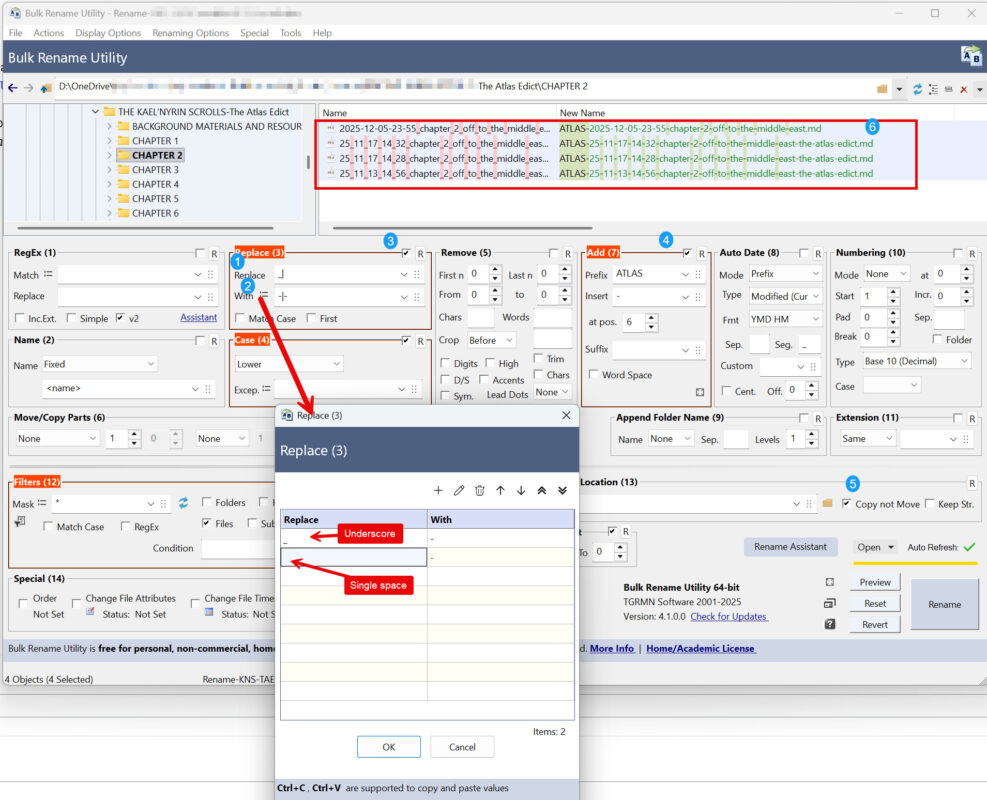
As this is not a tutorial, no explanations on how to use the software will be given. My screenshot below shows how I use it in one scenario.
Conclusion
My configuration and renaming works well for me. That’s it. That’s all that matters. Now back to your ‘dog-bathing’ or Netflix or whateverrrrr!