



Estimated reading time at 200 wpm: 8 minutes
Section 1: The Challenge of Interpretive Texts
Policy documents, legal texts, and regulatory instruments share a common feature: they are dense, layered, and conditional. A single provision may depend on a definition found elsewhere. That definition may itself contain exceptions or cross-references. The result is a text that is difficult to hold in working memory and even harder to communicate to others.
Whether or not you agree our Fat Disclaimer applies
Consider a typical structure. Clause A establishes a rule. Clause B provides an exception. Clause C defines a term that both A and B rely upon. The reader must navigate back and forth, testing each condition against the facts of a particular situation. This is not a failure of comprehension—it is a structural property of the text.
The difficulty is compounded when the text contains multiple clauses with superficially similar language but different triggers. For example, one clause may require that an event be “initiated in writing”. Another may require only that the reader “receive advice in writing” of the event. These are not the same condition, but they are easily confused—especially under time pressure, or when the reader is not familiar with the architecture of the document as a whole.
The cost of misreading a trigger, or of applying the test from one clause to another, can be significant. The tools available to navigate these texts have traditionally been limited: reading, annotating, summarising, and re-reading.
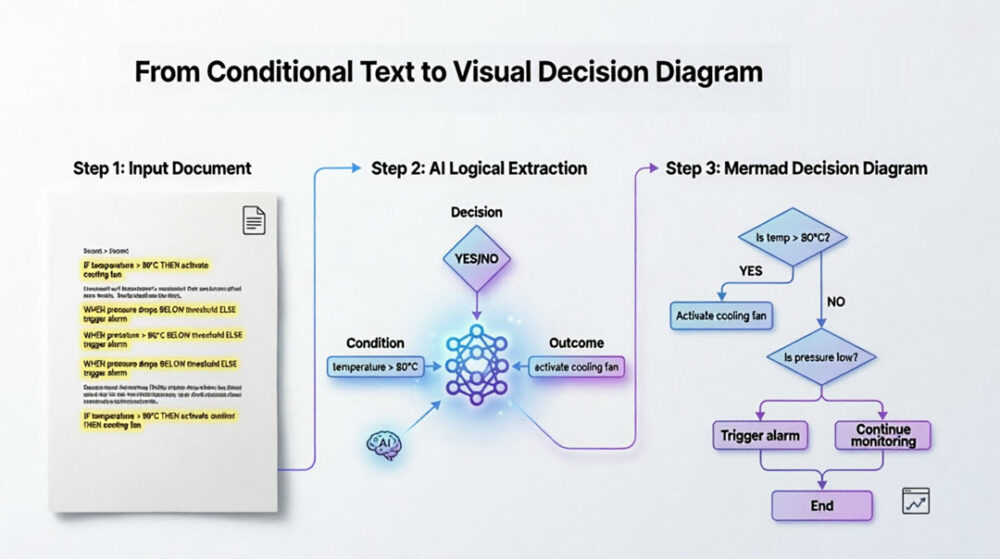
This article describes a different approach. It sets out a practical workflow for turning complex, conditional reasoning into a clear, visual decision diagram. The workflow uses AI models to extract the logical structure from a document and generate a diagram in Mermaid format. No one needs to understand what ‘Mermaid’ is. The Mermaid file that represents the diagram can then be opened, edited, and refined in a standard diagram editor such as Draw.io. The result is a shareable, testable, and revisable visual representation of the reasoning—one that makes the structure of the argument visible at a glance. It could also expose any gaps or misapplications in the interpretation.
Section 2: Why Text-Based Diagramming Works
Mermaid is a text-based diagramming language. The diagram is defined in plain text, not drawn manually. This matters because text can be generated, edited, version-controlled, and shared more easily than graphical files. A Mermaid diagram is stored as a few lines of code, not as a binary file.
Because the diagram is defined in text, it can be produced by an AI model. The model reads the policy document, extracts the logical structure, and outputs the diagram in a format that can be rendered immediately. There is no manual drawing, no alignment, no connector routing—the syntax handles the layout.
The same text file can be opened in any editor that supports Mermaid: Draw.io is preferred as it is well created over many years and it is free of charge forever. Once opened, the diagram becomes fully editable as shapes and connectors. Adjustments can be made without returning to the code. The mermaid file now open in Draw.io can be saved as a .drawio file
The text-based approach also supports iteration. If the reasoning changes or new information becomes available, the source can be updated and the diagram regenerated. This is faster and more reliable than redrawing the diagram manually.
Section 3: The Workflow
The following workflow uses an AI model to extract logical structure from a document and produce a diagram in Mermaid format. The diagram can then be opened and edited in draw.io or any compatible editor.
Step 1: Submit the Text
Provide the relevant document or document excerpts to the AI model. The text may include definitions, clauses, conditions, exclusions, and any other provisions relevant to the decision point being analysed.
Step 2: Instruct the Model
Request extraction of the key logical structure: the starting point, the decision points, the branches (YES/NO), and the outcomes. Specify that the output should be a Mermaid diagram. Optionally, request colour coding for clarity—for example, exclusions in red, confirmations in green, and decision points in yellow.
Step 3: Download and Open
Download the generated output as a .mermaid file. Double-click the file to open it directly in draw.io. The diagram will render as a fully editable set of shapes, text, and connectors.
Step 4: Edit and Refine
Adjust the layout, reposition elements, revise labels, and restyle colours as needed. Add annotations or additional context where the diagram would benefit from clarification.
Step 5: Export and Use
Export the final diagram as PNG, SVG, or PDF. Use it in emails, submissions, presentations, or personal records. The diagram makes the reasoning visible and testable, and provides a shareable artefact for communication with others.
Section 4 – Limitations and Caveats
This workflow is a tool for reasoning and communication, not a substitute for professional advice. The diagram is only as accurate as the text analysis that produced it. If the underlying policy text is misinterpreted, or if a clause is overlooked, the diagram will reflect that error.
Diagrams necessarily simplify. They reduce complex provisions to decision points and branches. This is useful for identifying structure and testing logic, but it cannot capture every nuance of a legal or regulatory text. The diagram should be used alongside the original document, not in place of it.
The AI model is not a legal expert. It can extract structure from text, but it cannot provide binding interpretations or legal opinions. The output should be reviewed carefully against the source material. Any conclusions drawn from the diagram remain the responsibility of the user.
Finally, the workflow depends on access to an AI model capable of generating Mermaid syntax. Where that access is unavailable, the same principles can be applied manually—though with greater effort.
Section 5 – Advanced Use Cases
The workflow described in Section 3 assumes the user has already identified the logical structure and requests a diagram of it. A more advanced use case shifts the burden: the user provides the document and a desired outcome, and the AI searches for a path through the provisions to that outcome.
How the Logic Works
- Parse the text — identify clauses, definitions, conditions, triggers, and exclusions.
- Model the decision structure — treat each clause as a node, each condition as a branch, each exclusion as a dead end.
- Trace the path — start from the trigger event or condition and follow the logical chain to the desired outcome.
- Report the result — either:
- The path exists, with each step specified.
- The path does not exist, with an explanation of where it fails.
- Diagram the path — generate a Mermaid diagram showing the route, including any alternative branches considered and rejected.
Potential Use Cases
| Scenario | Application |
|---|---|
| Policy coverage | Given a policy and a set of facts, is cover available under a specific clause? |
| Regulatory compliance | Given a regulation and a proposed action, does the action comply? |
| Contract interpretation | Given a contract and a desired outcome, is that outcome available under the terms? |
| Eligibility assessment | Given a set of criteria and an applicant’s circumstances, are they eligible? |
What the Output Includes
- The path found — a step-by-step explanation of the logical route.
- The Mermaid diagram — a visual representation of the path.
- Any obstacles — conditions that are not met, or exclusions that apply.
- Alternative paths considered — if relevant, with reasons they were rejected.
Key Considerations
It is for each user to ensure that an AI Model is carefully briefed.
| Factor | Implication |
|---|---|
| Ambiguity | Where the text is ambiguous, the AI notes the ambiguity rather than forcing a path. |
| Multiple paths | Where more than one path exists, all are identified, or the most direct is selected. |
| Uncertainty | If the text does not clearly support the outcome, the AI states that. |
| User judgment | The output is a tool for reasoning, not a binding interpretation. The user applies their own judgment. |
Advantage
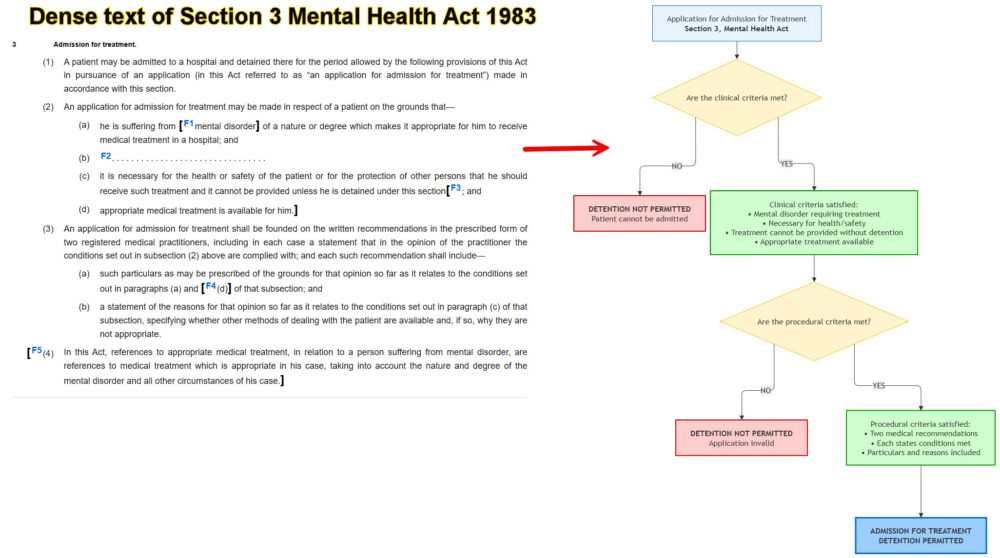
A diagrammatic representation of dense documents is easier to follow. The user or proposer will have circulated the text to a others who need to grasp key issues The proposer will have checked any diagrammatic picture for accuracy.
The method means that faster more effective communication of ideas.
Conclusion
The workflow described in this article offers a practical method for navigating complex interpretive texts. It transforms dense, layered provisions into clear, testable diagrams that reveal structure, expose gaps, and clarify reasoning.
The advantages are consistent across use cases:
- Clarity — the logical path is visible at a glance.
- Testability — each step can be examined and challenged.
- Shareability — diagrams communicate reasoning more efficiently than dense text.
- Editability — the diagram can be revised as understanding develops.
- Traceability — the reasoning remains anchored to the source text.
The workflow does not replace professional judgment. It is a tool for reasoning and communication, not a substitute for legal or regulatory advice. But where the text is complex, the stakes are high, and the path to a decision is uncertain, this approach provides a disciplined method for finding and presenting the argument.
Whether used to clarify an existing position, test a novel interpretation, or search for a path to a desired outcome, the combination of AI-assisted logic extraction and editable visualisation offers a practical advantage: the reasoning becomes visible, and the path becomes clear.