






Estimated reading time at 200 wpm: 19 minutes
There is a distinct, almost magical phase when you first acquire a modern, highly capable car. For the first few weeks, your focus is entirely on the pure experience of driving. You enjoy the smooth acceleration, the responsive handling, and the quiet comfort of the cabin. You simply press the pedal and go, trusting the machine completely. In the realm of local artificial intelligence, this honeymoon phase occurs when you first set up a new interface. You type a prompt, you receive a brilliant response, and you are entirely absorbed in the flow of the conversation.
Whether or not you agree our Fat Disclaimer applies
For many, this interface is OpenWebUI (OWUI). It is a remarkably polished, self-hosted frontend that allows users to interact with various AI models through a clean, unified dashboard. When you use OWUI, particularly in a specific setup where it is running inside Docker on a Windows 11 host machine, you are essentially using it as a sophisticated conduit. It is not the AI brain itself; rather, it is the secure, efficient mechanism that routes your API calls to your chosen custom or external models, keeping your data neatly contained.
Later on you may find yourself wondering: How does this fine machine actually work? It is the digital equivalent of pulling over to the side of the road, turning off the engine, and popping the bonnet to see what makes the drive so remarkably seamless.
In exploring this hidden machinery, we will frequently use the word ‘you’. This is not meant as direct instruction or technical advice. Rather, it is the editorial ‘you’—a narrative tool used to place us inside a shared, hypothetical scenario. It is much like describing how a car’s traction control engages when ‘you’ drive on wet tarmac; it simply describes a mechanical reality rather than advising a course of action.
This article is an invitation to understand the architecture of your own digital workspace or on that you can create for free. I’m tracing the fuel lines, examining the electronic control units, and decoding the networking connections that make the whole system function. By the end, the illusion of simplicity will be replaced by a clear, demystified understanding of the engineering that makes your calm, focused AI interactions possible. Knowledge is power, but only if activated.
No special equipment or knowledge is required for anything written here. With suitable AI assistance it’s easy!
| Technical Component | Analogy Equivalent | Core Function |
|---|---|---|
| Windows 11 (Host OS) | The driveway – your plot of land | The foundational environment where everything physically resides |
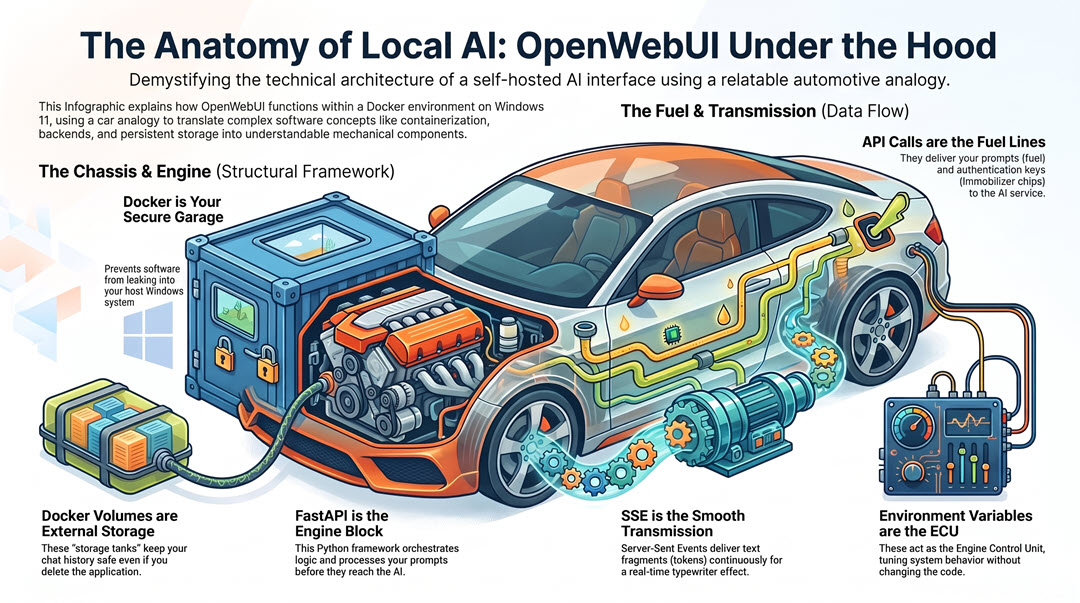
| Docker (Platform) | The secure garage / workshop | Provides isolation and enforces boundaries for the software inside |
| Docker Container | The chassis | A self-contained structural frame holding the application and its dependencies |
| OpenWebUI (Application) | The car itself | The functional vehicle you actually drive and interact with |
| FastAPI (Backend) | The engine block | The central processing layer that orchestrates all application logic |
| API Calls / Payloads | The fuel lines | The structured messages carrying prompts to the external AI model |
| API Endpoints | The fuel station | The precise digital address where the AI service listens for requests |
| Headers / API Keys | The immobiliser chip | Authentication metadata proving you are an authorised user |
| Streaming / SSE | The transmission | The continuous, smooth delivery of tokens to your screen |
| Tokens | Fuel droplets | The small fragments of text generated by the AI model |
| Docker Volumes | External storage bolted to the garage wall | Persistent storage existing outside the ephemeral container |
| Database (SQLite/PostgreSQL) | The filing cabinet inside storage | The structured system recording chat history and settings |
| Frontend (Svelte/React) | The dashboard / instrument cluster | The visual interface rendered in your web browser |
| Environment Variables | The ECU (Engine Control Unit) map | The tuning parameters configuring the system’s behaviour |
| HTTPS Encryption | The armoured fuel line | Secures data in transit from interception |
1. The Garage and the Chassis: Docker on Windows 11
To understand how this system operates, we must first look at the environment that houses it. If OpenWebUI is the car you are driving, Docker is the secure, isolated workshop or garage in which that car is kept. Within that is a separate thing called ‘Docker containers’. These make up the structural chassis of your car.
In technical terms, Docker is a containerisation platform. As the platform, it acts as the management system for your digital garage. It provides the isolated environment, enforces strict boundaries, and ensures that whatever is built inside does not leak oil onto your main Windows 11 driveway. It keeps your host operating system clean, secure, and uncluttered.
Inside this garage, Docker packages software into standardised, isolated units known as containers. Think of containers as the self-contained vehicle chassis. It holds the OpenWebUI application and every single dependency it needs to run. This ensures the software behaves exactly the same way regardless of the underlying computer. It is a complete structural frame, entirely separate from any other vehicle in the workshop.
OpenWebUI is the specific car built onto this chassis. Because the application operates within this isolated frame inside the secure garage, the high-speed electronic work happening inside—managing network handshakes, processing data, and handling API calls—does not spill over into your host operating system. It prevents conflicting software versions and protects your personal files from accidental modification.
Furthermore, this architecture guarantees reproducibility and cleanliness. If you ever decide to uninstall the application or start fresh, you simply remove the chassis. Because the software was never directly installed into the Windows registry or scattered across your personal folders, removing it leaves your host machine perfectly clean. The garage is simply emptied, leaving not a single trace of oil on the driveway.
2. The Engine Block: FastAPI and the Backend
With the chassis securely housed in its isolated garage, we can now turn our attention to what actually powers the vehicle. Beneath the polished dashboard of OpenWebUI lies the engine block: a Python-based web framework called FastAPI.
In software terms, a framework is a pre-built structural foundation that developers use to construct applications without having to write every component from scratch. FastAPI is specifically designed for building APIs—those agreed-upon communication protocols that allow different software programmes to speak to one another. It is chosen for this role because it is exceptionally fast and efficient at handling multiple simultaneous requests, much like a high-performance engine that delivers power smoothly across a wide range of revs.
When you type a prompt and press Enter, it is FastAPI that first receives that input. It acts as the central processing layer of the entire system. It unpacks your message, retrieves the relevant conversation history from the database, and applies the application’s internal logic. This logic includes tasks such as formatting the chat context, validating your authentication credentials, and determining which AI model you have selected for this particular exchange.
Once all of this preparatory work is complete, FastAPI assembles everything into a precisely structured package and hands it off to the next stage of the journey. It also manages the return trip, receiving the AI’s response and relaying it back to your browser. It is the component that ensures every moving part of the backend operates in tight coordination. Without this engine block, the polished frontend would have nothing to drive it—just a beautiful dashboard connected to an empty engine bay.
3. The Fuel Lines: API Calls and Endpoints
An engine is useless without a reliable means of delivering fuel. In our system, the fuel lines are the API calls—the structured messages that carry your prompt from the OpenWebUI engine block out to the external AI model that will actually generate your response.
When FastAPI has finished its preparatory work, it constructs a payload. The payload is the actual data being transmitted in the request. It is typically formatted in JSON (JavaScript Object Notation), which is a lightweight, standardised data format that both humans and machines can read with ease. This payload contains your prompt text, the identifier for your chosen model, and parameters such as temperature—a setting that controls how creative or predictable the AI’s output will be.
Crucially, the payload is wrapped in headers. Headers are supplementary pieces of metadata attached to the request, and they almost certainly include your API key or authentication token. This is the digital equivalent of an immobiliser chip in your car key; it proves to the receiving server that you are an authorised user before any processing begins.
This packaged request is then sent to an endpoint. An endpoint is the precise digital address—expressed as a URL—where the AI service listens for incoming requests. If you are using a cloud provider, this endpoint will be a remote server address. The transmission should be encrypted via HTTPS (Hypertext Transfer Protocol Secure), which scrambles the data in transit so that it cannot be intercepted or read by third parties.
The entire journey outward—from your keystroke, through the engine block, down the fuel lines, and arriving at the endpoint—typically takes a fraction of a second. It is a remarkably efficient delivery system, ensuring that the right fuel reaches the right destination with the right credentials, every single time.
4. The Transmission: Streaming and Server-Sent Events
With the payload delivered to the external AI model, the engine has done its work and generated the response. But how does that response reach your screen? If this were a standard web request, your browser would send the prompt and then sit in silence, staring at a blank screen until the AI finished generating the entire reply, which could take minutes. The text would then appear in one massive, sudden jolt.
To prevent this jarring experience, the system relies on a smooth, continuous delivery mechanism: the transmission. In technical terms, this is achieved through streaming, often utilising a protocol called Server-Sent Events (SSE).
AI models do not generate full sentences at once; they calculate and output text in tiny fragments known as tokens. A token is roughly three-quarters of a word or a single punctuation mark. Instead of waiting for all tokens to be computed, the external server pushes each one back to OpenWebUI the millisecond it is created.
SSE facilitates this by opening a persistent, continuous connection between the server and your browser. Unlike a standard HTTP request, which closes immediately after a single exchange, this connection remains open, allowing data to flow continuously in one direction. It is the digital equivalent of an advanced automatic transmission smoothly and progressively delivering torque to the wheels as the engine revs, rather than a clutch dropping all at once.
As each token travels down this open connection, OpenWebUI catches it, reassembles the fragments into coherent words, and updates your screen instantly. This is the specific mechanical process that creates the calm, typewriter-like streaming effect you see as you read the AI’s thoughts unfolding in real time.
5. The Storage Tanks: Volumes and Databases
When you turn off a modern car, the engine stops, but the vehicle remembers its mileage, its radio presets, and its fuel level. In the Docker environment, however, the default behaviour is quite different. Containers are inherently ephemeral, meaning they are designed to be temporary and short-lived. If you were to delete and recreate your OpenWebUI container, everything inside it would be instantly and permanently destroyed.
Clearly, you cannot have a system that forgets your entire conversation history every time it restarts. To solve this, the architecture employs digital storage tanks known as Docker Volumes.
A volume is a designated, persistent storage area located on your actual Windows 11 hard drive. It is “mapped” or bolted directly onto the isolated container. While the container itself remains a temporary chassis, the volume acts as the external fuel tank and the digital odometer. It exists entirely outside the container’s lifecycle.
Inside this persistent volume, OpenWebUI utilises a database—typically SQLite or PostgreSQL. The database is the highly structured filing system that physically writes your prompts, the AI’s responses, your custom model configurations, and your user settings to the Windows host machine.
Because this data is stored in the mapped volume rather than inside the ephemeral container, it survives any updates, restarts, or complete rebuilds of the software. But it gets better. Unlike with your car, you can swap out the chassis, tune the engine, or even dismantle the garage entirely, and as long as the storage tanks remain bolted to the wall. Your accumulated mileage and conversational history are perfectly preserved, ready for your next journey. And you can do this with knowledge available for free.
6. The Dashboard: The Frontend Interface
With the engine running, the fuel flowing, and the data safely stored, we arrive at the part of the machine you actually touch: the dashboard. When you sit in a car, you do not manually adjust the air-fuel mixture or monitor the alternator’s voltage. You interact with the steering wheel, the pedals, and the instrument cluster.
In the OpenWebUI architecture, this interactive layer is the frontend interface. It is the visual environment rendered in your web browser—the text input boxes, the conversation sidebars, the model selection dropdowns, and the dark mode toggles.
Technically, this dashboard is built using a modern frontend framework, such as Svelte or React. During the Docker build process, this framework compiles the application’s visual logic into static files: HTML for the structure, CSS for the styling, and JavaScript for the interactivity.
When you navigate to your local address, the Docker container simply hands these static files over to your web browser. Your browser then acts as the local renderer, executing the JavaScript to build the interactive dashboard right before your eyes. It is the JavaScript that listens for your keystrokes, manages the visual layout, and handles the smooth scrolling of the chat history.
The dashboard is also responsible for the initial packaging of your thoughts. When you press Enter, it is the frontend that captures your text, bundles it into a request, and sends it down to the FastAPI engine block. It translates your physical keystrokes into the digital language the rest of the machine understands, providing a calm, intuitive cabin from which to direct the immense computational power running beneath the bonnet.
7. Tuning the ECU: Environment Variables
Modern vehicles are governed by an Engine Control Unit (ECU), a computer that manages everything from ignition timing to fuel injection. If you want to alter the car’s performance, you do not physically rewire the engine bay. Instead, you update the software map—a process known as remapping. In the Docker environment, this exact function is performed by environment variables.
Environment variables are dynamic, named values that dictate how a running process behaves. In your OpenWebUI setup, these variables are typically defined in a configuration file, such as a docker-compose.yml blueprint, before the container even starts.
When you launch the system, Docker reads these variables and injects them into the container’s environment. They act as the fundamental tuning parameters for your application. For instance, a variable might dictate whether the web interface requires a login password to access, or it might specify the exact digital address of the external AI endpoint the system should contact.
This mechanism is profoundly powerful because it allows you to completely reconfigure the behaviour of the application without ever having to open the engine block and edit the underlying Python code. If you want to change a setting, you simply adjust the variable in your configuration file and restart the container.
It is the digital equivalent of plugging a laptop into the car’s diagnostic port and adjusting the ECU map. You are safely tuning the machine’s core behaviour from the outside, ensuring the system runs exactly to your specifications while keeping the internal mechanics perfectly intact.
8. Refining Your Driving Habits: Optimising the Experience
Understanding the machinery beneath the bonnet does more than satisfy intellectual curiosity; it can fundamentally change how the vehicle is operated. When the driver understands how the engine processes fuel and how the transmission delivers power, smoother, more efficient driving habits naturally follow. In the context of OpenWebUI, this translates to practical adjustments that optimise performance, preserve resources, and ensure the system remains as responsive as the day it was built.
Token Management and Context Windows
Every AI model has a finite context window, which is the maximum amount of text it can hold in its active memory at any one time. Think of this as the physical space inside the car’s cabin. If too much luggage is packed into the boot and every passenger seat is filled, the vehicle becomes sluggish, and the engine works much harder.
As a conversation grows longer, the payload sent down the fuel lines includes the entire chat history. Eventually, this history fills the context window, and the model’s performance can degrade. Recognising this mechanical limit allows for better fuel efficiency. When a discussion reaches a natural conclusion, the most effective habit is to start a new chat. This clears the cache, empties the cabin, and ensures the engine is running light and responsive for the next journey.
Prompt Structuring for the Backend
Just as a driver must provide clear, decisive inputs to the steering wheel to navigate a corner smoothly, clean, structured inputs must be provided to the FastAPI backend. The engine block is highly capable, but it processes data exactly as it is received.
When prompts are structured with clear headings, bullet points, or distinct paragraphs, the backend can parse the payload much more efficiently. It reduces the cognitive load on the external AI model, allowing it to focus its computational power on generating a high-quality response rather than deciphering a disorganised block of text. By adopting the habit of formatting inputs logically, the ECU is provided with precise telemetry, resulting in a smoother ride and more accurate outputs.
Monitoring Host Resource Usage
Even the most finely tuned engine will overheat if it is pushed beyond its physical limits. While Docker isolates the OpenWebUI container, it still draws upon the physical resources of the Windows 11 host machine, specifically RAM and CPU cycles.
Occasionally checking the dashboard gauges is a sound habit. Windows 11 provides built-in resource monitoring tools, and Docker Desktop offers its own dashboard to track container consumption. If the host machine begins to slow down, checking these metrics will reveal if the container is consuming a disproportionate amount of memory. Keeping an eye on these vital signs ensures that the digital garage remains a stable environment, preventing system-wide lag.
The calm, intuitive interface of OpenWebUI is the result of deliberate engineering, secure containment, and efficient data routing. By understanding the chassis, the engine, and the fuel lines, the user transitions from a passive driver to a master of the machine, fully equipped to enjoy the journey ahead. Eventually, they do some doughnuts in their secure patch and show off their skid marks online! 💯🤣
Exploring the Aftermarket: Advanced Customisations and Ecosystems
Once the fundamental mechanics of the chassis and engine are understood, the natural progression is to explore the vast aftermarket of customisations available. OpenWebUI is a highly modular ecosystem designed for continuous refinement. This is where the initial drive transitions into a deep, ongoing journey of discovery. It encourages users to delve into online resources, documentation, and community forums to unlock the platform’s full potential.
Consider the ability to switch between different AI models mid-conversation. But now the driver has a way of swapping engines rapidly and for free based on the expected terrain ahead! You want a calm motorway cruise; you have an engine to swap in with one click. You wanna go rallying down in Australia? 😱🫣 Wow! Just swap in a high-performance AI model into OpenWebUI – plus some knowledge and skill – for navigating complex demanding terrain! You’re not just changing gears; you’re changing engines on the fly – literally!
Furthermore, the integration of Knowledge bases transforms the vehicle from a standard cruiser into a specialised off-roader. By feeding the system specific documents and data, you equip it with the contextual awareness required to navigate highly technical or proprietary terrain.
The ecosystem extends far beyond simple text generation. Users can configure dedicated workspaces with custom models tailored to specific professional tasks. The platform supports an array of advanced add-ons that you can build with practice: tools, skills, and functions. These act as digital winches and tow bars, extending the vehicle’s capabilities into external applications and APIs. Fine-tuning advanced parameters and applying subtle tweaks to the interface ensures the cabin is configured exactly to your ergonomic preferences.
Finally, the journey includes mastering fuel economy. 🚗⛽🏪 By exploring token-efficient and cost-effective models, or by integrating a gateway like OpenRouter, you gain access to a vast network of AI providers through a single, optimised fuel line. The community guides and official documentation serve as your roadmap for these advanced modifications, turning a standard vehicle into a bespoke machine.
Conclusion: Get ready for the Open Road (pun intended)
You are no longer merely a driver pressing a pedal you don’t quite understand. You now have a grasp of how the machine has been put together: the flow of the data, and the quiet containment that keeps the rest of your house secure. You can rev your engine safely – because you like to hear that ‘sound’. I see you – you’re smiling! 😊😂
The horizon of local artificial intelligence is vast and constantly evolving, but with this foundational knowledge, it is a terrain you are fully equipped to navigate.
The journey, however, is far from over. The ecosystem surrounding OpenWebUI is dynamic, driven by a passionate community and relentless development. We invite you to step out of the cabin and into the wider world of documentation, community forums, and shared configurations. There is always a new skill to integrate, a parameter to refine, or a more efficient model to discover.
This ongoing exploration takes place in an environment uniquely designed for safe experimentation. Because your application is housed within Docker, you are free to tinker without fear of catastrophic failure. Before making a major adjustment, you can back up your persistent volumes. If a new configuration causes the engine to stall, you can simply roll back your changes or spin up a fresh container, leaving your Windows host completely unharmed. It is a secure, forgiving workshop that actively encourages curiosity.
The keys 🗞️ are in your hand, the engine is idling ⏲ smoothly, and the road ahead is entirely yours. Enjoy the drive. 🏎️..