



Estimated reading time at 200 wpm: 9 minutes
No not BACON you moron; it’s BCON. Anyone who has spent time with large language models knows the pattern. You ask a simple question, and back comes a thousand-word barrage in two seconds: three paragraphs of preamble, a restatement of your own prompt, a meandering middle section, and a conclusion that says nothing new. The information you wanted was in there somewhere, buried under filler. The problem is that models are designed to impress. They don’t care about you, no matter how loving they may appear.
Whether or not you agree our Fat Disclaimer applies
I had enough of my time wasted. I created a solution – that works for me. It’s not guaranteed to work for ‘everybody’. It’s this simple. Lock in a Base Condition and have it agreed early in the conversation. The Base Condition, or BCON, is a small piece of prompt engineering. Hold on – you don’t need to be an IT expert or ‘engineer’ to do this! The BCONs set explicit word caps, bans the usual filler phrases, and forces the model to lead with the answer.
Not everybody is ‘superintelligent’, so I don’t expect ‘everybody’ or anyone to understand the following map or anything else said in this post.
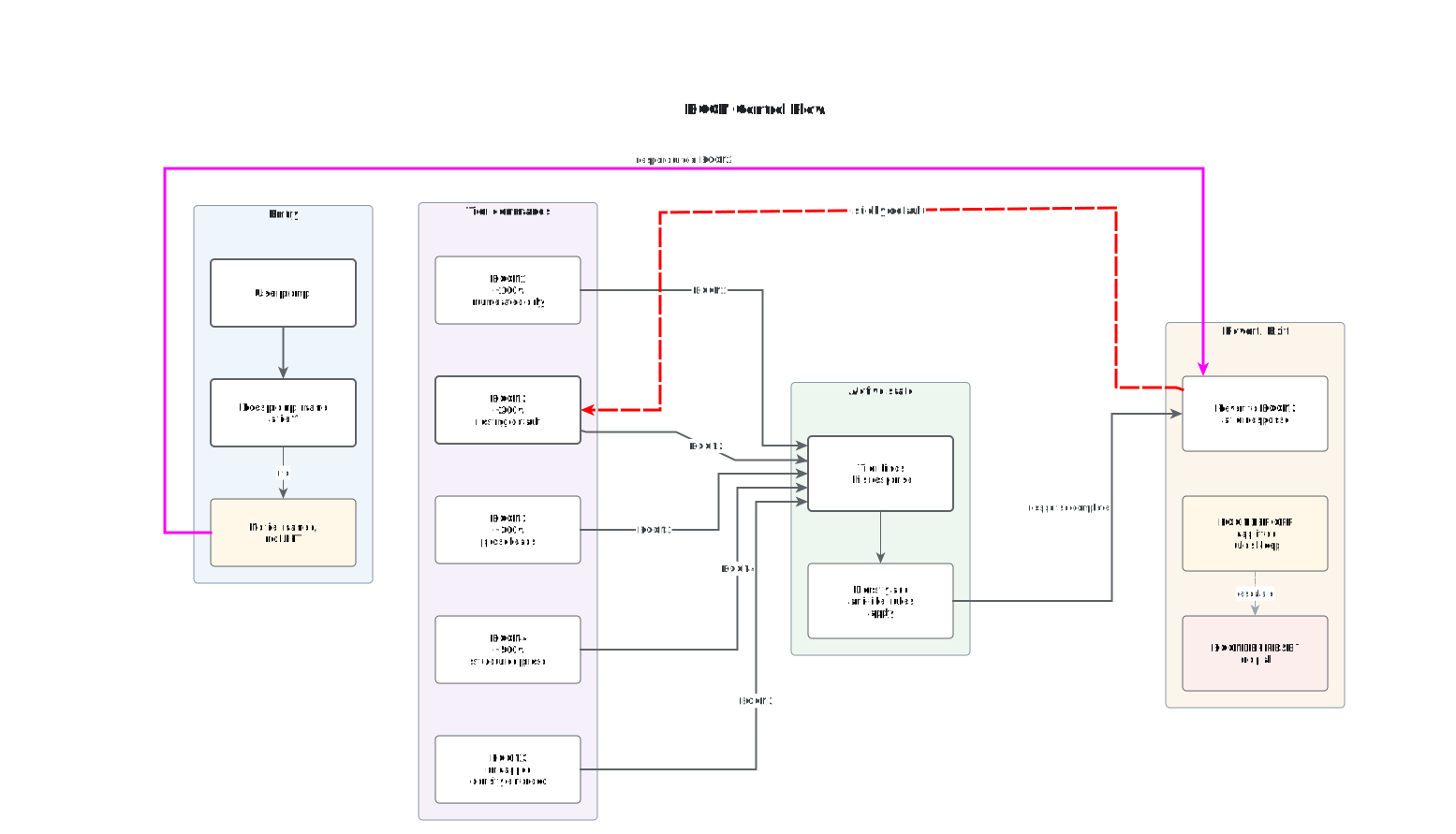
Because the same instruction gets retyped constantly, it makes sense to store each variant as an Espanso trigger. Espanso is a cross-platform text expander: you type a short keyword, and it pastes a longer block of text in its place. That makes it an ideal delivery mechanism for prompt scaffolding.
What follows is a short guide to the BCON tiers, the reasoning behind them, and the Espanso configuration that puts them at your fingertips. All triggers appear together in a single code block, so you can copy the whole thing into your Espanso configuration file in one go. Those who do not have Espanso or can’t be arsed to get it working, can continue cutting and pasting BCONs as outlined below.
Look, I don’t care – it you want to write the triggers as ‘bacon’. Go right ahead. And if you want to save all to a text file and copy and paste, that’s a matter for you. Just don’t get within swinging distance of me to ask me to do it for you!
1. What BCON Actually Means
BCON stands for Base Condition. It is a user-set word cap that constrains every AI response. Think of it as a contract you hand the model before it starts writing: here is the ceiling, here are the banned phrases, here is how to end.
The idea is deliberately simple. Most prompt engineering tries to add richness. BCON subtracts. It removes the padding, the throat-clearing, and the self-referential summary, leaving only the payload.
2. The Tiers
The system uses grades rather than a single flat cap. This lets you match the constraint to the task. A factual lookup needs a tighter leash than a technical explanation.
- BCON1 — roughly 100 words. Ultra-tight. Bullets only.
- BCON2 — roughly 200 words. The sensible default. Direct, minimal filler.
- BCON3 — roughly 300 words. Standard cap. Answer plus light supporting detail.
- BCON4 — Max 500 words, numbers and punctuation included.
- BCONX — uncapped, but density is still enforced. Every sentence must carry information.
- BCONSLOP — Slop avoidance.
Word counts are targets, not straitjackets. The point is the discipline, not the arithmetic.
3. The Rules Behind Every Tier
Each BCON variant shares the same core enforcement rules. Only the ceiling changes.
Answer first. No preamble. Bullets over prose. One idea per line. The cap is hard unless the user explicitly lifts it. Never auto-expand. If more depth is possible, offer it in a single line at the end and wait for a yes or no.
The last rule matters more than it looks. A model that dumps everything at once has made the decision for you. A model that offers expansion puts the choice back in your hands.
4. Why Espanso
Espanso turns a keyword like :bcon2 into a full instruction block. That means you can retune the model’s behaviour mid-conversation without breaking your flow or retyping the same paragraph for the hundredth time. It is the difference between writing a prompt and invoking one.
5. The Triggers
The following block contains every trigger discussed above, including a definition trigger that spells out the terminology in case you need to remind the model what the terms mean. I have the stuff copied into my Espanso ai-drafting.yml
matches:
- trigger: ":bcondef"
    replace: |
     BCONDEF means definitions. This is preparatory only for future work. Nothing here activates any user-required state. Tier commands become active and imperative only when the user issues them.
      BCON2 is not issued now. When it is given, it becomes a sticky base layer: no filler, answer first, density over volume, one idea per line, expand? offer.
      Tiers add constraints on top of BCON2:
      BCON1 = +100-word cap. BCON3 = +300-word cap. BCON4 = +500-word cap. BCONX = uncapped.
      LIFT: "BCONDEF OFF" lifts cap, keeps base rules. "BCONDEF RESET" drops everything.

      TIERS:
      BCON1 = ~100 words. Ultra-tight. Numerated points only. Numbers and punctuation count towards the cap.
      BCON2 = ~200 words. Default resting tier. Direct, minimal filler. Numerated points preferred where the material suits them.
      BCON3 = ~300 words. Standard cap. Answer first, then supporting detail. Prose leads; numerated points only where the material resists prose.
      BCON4 = ~500 words. Structured. Prose leads throughout. Numerated points only if a list genuinely fits better than a sentence.
      BCONX = uncapped. Density still enforced. Still inside the BCON system, still bound by its rules — the only thing lifted is the length ceiling.

      TERMS:
      BCON = Base Condition. A user-set word cap that constrains every AI response.
      Density = information per word. Prefer compression over volume.
      Filler = preamble, restating the question, "It's important to note", "In conclusion".
      Expand? = one-line offer at the end. "y" expands, "n" cancels and the offer lapses, silence means the offer lapses without comment.

      CATALOGUE:
      BCONSLOP for the anti-slop catalogue. It lives in a separate instruction. Nothing to resolve as this is preparartory.

      RULES:
      Answer first. No preamble. One idea per line where numerated. The cap is hard unless the user lifts it. Never auto-expand. When offering expansion, offer 1–3 options only, never more. Numbers and punctuation count towards any cap.

      YOU WILL NOT ASK FOR TIER COMMANDS, RULES, OR BCONSLOP. WAIT FOR THE USER TO PROVIDE.

  # =========================================================
  # BCONSLOP — anti-slop catalogue. Reference only.
  # =========================================================
  - trigger: ":bconslop"
    replace: |
      BCONSLOP — avoid slop like the plague.
      ① The list that never ends.
      ② The seesaw sentence (not X but Y).
      ③ The wisdom ending.
      ④ The question volley.
      ⑤ The visible skeleton (First, second, third; promise, problem, solution — a plan with sentences draped over it).
      ⑥ Everything once, nothing twice (touches funding, staffing, regulation, technology, public opinion — examines none). Real writing obsesses for a while and cheerfully neglects the rest. Unevenness is human.
      ⑦ The returning metaphor (opens "at a crossroads", closes "the road ahead"). Real writing drops images and rarely looks back. Loose threads are human.
      ⑧ Words that try too hard ("a testament to the vibrant community at the heart of this transformative journey"). Real writing lets plain nouns and verbs carry the weight.
      ⑨ The dash that does too much. Em dashes have uses — contrast, interleave, sudden turns. Every few sentences, they signal machinery.
      ⑩ The choppy finish (short punchy fragments posing as statements: "Only patterns." "That is the point." "Then it stops.").
      ⑪ The mechanical rhythm (abrupt bursts of brevity and sprawling lines that lose momentum). Human cadence is steadier.

  # =========================================================
  # TIER COMMANDS — activation. Each overrides BCON2 for
  # the current response, then reverts to BCON2.
  # =========================================================
  - trigger: ":bcon1"
    replace: |
     BCON1 activated: BCON2 base (200-word floor, no filler, answer first) + 100-word cap. Numbers and punctuation count. Numerated points only. One idea per line. End with "Expand? (y/n)". BCON2 remains active.
      BCON1 activated: Max 100 words, numbers and punctuation included. Answer directly. No preamble, no restating, no filler. Numerated points only. One idea per line. End with a single line: "Expand? (y/n)". Revert to BCON2 after this response unless another tier is issued.

  - trigger: ":bcon2"
    replace: |
      BCON2 activated: Max 200 words, numbers and punctuation included. Answer directly. No preamble, no restating. Numerated points preferred where the material suits them. One idea per line. Cut filler. End with 1–3 expansion options, never more. BCON2 is the resting tier; remain here unless another tier is issued.

  - trigger: ":bcon3"
    replace: |
      BCON3 activated: Max 300 words, numbers and punctuation included. Direct answer first, then supporting detail. No preamble, no restating, no filler. Prose leads. Numerated points only where the material resists prose. End with up to 3 named expansion options. Revert to BCON2 after this response unless another tier is issued.

  - trigger: ":bcon4"
    replace: |
      BCON4 activated: Max 500 words, numbers and punctuation included. Direct answer first, then supporting detail. No preamble, no restating, no filler. Prose leads throughout. Numerated points only if a list genuinely fits better than a sentence. End with up to 3 named expansion options. Revert to BCON2 after this response unless another tier is issued.

  - trigger: ":bconx"
    replace: |
      BCONX activated: Uncapped. Every sentence must carry information. No preamble, no restating, no filler. Prose leads; headers only if they aid scanning. Density over volume. Still inside the BCON system — only the length ceiling is lifted. End with up to 3 named expansion options. Revert to BCON2 after this response unless another tier is issued.

  # =========================================================
  # CONTROL COMMANDS.
  # =========================================================
  - trigger: ":bconoff"
    replace: |
      BCONDEF OFF. Exit the BCON system entirely. Cap lifted, tier tracking stopped. Anti-filler and anti-slop habits may persist as residual behaviour, but no BCON rule binds. The user is not locked in to any baseline.

  - trigger: ":bconreset"
    replace: |
      BCONDEF RESET. Drop all BCON conditions, including the BCON2 resting default. Revert to default model behaviour. The user is not locked in to any baseline.
6. Quoting Triggers in Espanso
A common point of confusion: do triggers need quotation marks in the YAML? The answer is yes, in this case, because every trigger starts with a colon. A leading colon can be parsed ambiguously, so wrapping the trigger in double quotes is the safe choice. Alphanumeric triggers without special characters do not need quotes, but consistency is easier to maintain than case-by-case judgement.
The replace blocks use the pipe symbol, which tells YAML to treat everything beneath as a literal multi-line string. Those blocks should be left unquoted.
7. Extending the System
Two obvious extensions exist. The first is a form-based trigger, where Espanso prompts you for a custom word cap on the fly rather than forcing you to pick a preset tier. The second is a bare rules trigger, useful for pasting the enforcement rules mid-conversation when the model starts drifting back towards its verbose habits.
Neither is strictly necessary, but both are cheap to add once the base configuration is in place.