






Estimated reading time at 200 wpm: 28 minutes
Origins and need
Discussions with AI Models normally require the whole thread of the discussion to be ‘uploaded’ with each prompt a user makes. For long form discussion most of that text will be in the thread and generated by the AI model. This means that after 20 rounds the cache uploaded could easily reach 30,000 to 50,000 tokens. Why? Each round accumulates and is uploaded. That costs. It may sound like ‘not much’ – say $0.20 per round. But wait – that could easily end up as $1.50. Then what about cumulative costs across many other threads. Every penny counts.
Whether or not you agree our Fat Disclaimer applies
AI responses are often so long if you’re doing true analysis of some issue. It could take more than 5 minutes to read, process as a human and type another prompt. By that time the cache in the cloud has gone cold and the next round gets costed for a cache miss. Huh? What that means is that users are paying for compute on stuff that may have become irrelevant in the early part of the thread.
So the question is why should all that go up to the Data Centre if only a fraction is important. Why should the AI companies decide? Or in the case of OpenWebUI, why should it decide how much you or I pay.
Thread Trim is a unique creation that lets the user choose, prompt by prompt, how much of a long thread goes to the model. On a live thread, sending the newest 10% cut the prompt from 47,005 to 7,014 tokens and the cost per call from $0.199 to $0.040. That’s an 80% saving!
It was built in one session on 10 November 2026 for Open WebUI (OWUI) v0.13, running in Docker on Windows 11 and connected to models through OpenRouter. It has two parts:
- The Trim button, in the message bar. A click opens tickboxes for 10% to 60%. The choice applies to the next prompt in that chat only, then clears.
- The Thread Trim filter, on the OWUI server. It sends the system prompt, the chosen newest share of the thread and the new prompt. A status line under each reply confirms what went up.
Nothing is deleted. The full thread stays on screen and in the database, and the next prompt can send all of it again.
Replies also started sooner. The full-thread call took 18.4 seconds to its first words; the 10% call took 5.5 seconds.
The user decides what is relevant. The tool makes that judgement quick to apply and easy to check.
Recognition of need
Every new prompt in a thread resends the whole thread, so each turn costs more than the last. In practice, much of what is resent no longer matters.
Long working threads drift. A conversation may open on one topic, explore several others and end far from where it began. By the fiftieth exchange, the first twenty are often unrelated to the question in hand. Yet OWUI sends them all, every time.
The user pays three ways for this:
- Cost. Input tokens are billed on every call, including the old material.
- Delay. A larger prompt takes longer to read before the first words appear.
- Ceiling. A long enough thread will eventually exceed the model’s context window and fail.
People do not work like this. In a long conversation, a person carries the recent part forward and lets the early part fade. Someone at minute 80 of a two-hour interview is not re-reading the first five minutes. The aim was to give the user that same control: to send what matters now, by judgement, and to see what was sent.
How the need came to awareness
The need surfaced in the user’s own OpenRouter activity log. Over one working day, a single Gemini 4 Argon thread grew from 15,272 to 47,005 prompt tokens, and each call cost more as it grew.
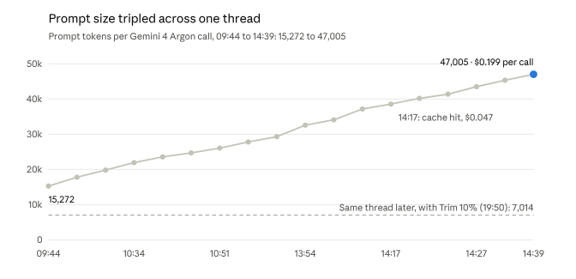
The user exported the log to look into context windows. The first question was why the running total never reached 128,000 tokens, given that most models allow that much. The answer was that the window applies per call (next section). That answer exposed the real issue: each call resent everything before it.
Two further points came out of the same log:
- Background calls. Small calls of about 3,000 tokens to inclusionai/ling-3.0-tiny ran seconds before most Argon calls. These were OWUI’s task model, set up earlier to write titles and tags. They cost fractions of a cent and are not part of the problem.
- Caching softened one call. At 14:17, 35,092 of 38,539 prompt tokens were served from cache, and the call cost $0.047 against about $0.16 for its neighbours. Caching did not happen on most calls, so it could not be relied on.
The calls shown appear to belong to one thread, judging by their steady growth. The trimmed call at 19:50 was in the same thread, after it had grown further.
Context windows explained briefly
A context window is a limit on a single call, not a running total across a thread. It covers what is sent (the prompt) plus what comes back (the completion).
The model keeps no memory between calls. So the client, here OWUI, rebuilds the thread and sends it whole each time. Adding up the prompt sizes across a thread therefore overstates usage: each prompt already contains all the ones before it. The figure that matters is the latest prompt plus its reply.
Three points shaped the design:
- The reply must fit too. A model with a 128,000-token window and a 120,000-token prompt can write at most 8,000 tokens back.
- OpenRouter does not trim by default on large models. Its middle-out transform, which cuts messages from the middle of a prompt, is on by default only for models with 8,192 tokens of context or fewer. Without it, an oversized request fails with an error (OpenRouter docs).
- OWUI does not trim either. It sends the full history unless Context Compaction or a filter Function is set up (OWUI docs).
The output cap is a separate limit. On the same day, one call hit 131,072 completion tokens and stopped with finish reason length; another, at 113,739 reasoning tokens, was cancelled by hand. Both were runaway output, not context overflow.
Design thinking
Design principles
The user decides what is relevant; the tool only applies that decision and shows what it did. Six principles followed from that, and every later choice was tested against them.
- Judgement stays with the user. No automatic rule decides what to cut. The user knows where a thread has drifted; the model does not.
- Nothing is hidden. A status line under each reply states what went up, for example “sent 6 of 51 earlier messages”.
- Nothing is deleted. The full thread stays on screen and in the database. Only what is sent changes.
- Per prompt, per chat. Each choice covers one prompt in one chat, then clears. Different prompts need different amounts.
- Fixed, predictable rules. The cut is a share of messages, always falling at one of the user’s prompts. The system prompt and the new prompt always go.
- Responsibility is the user’s. If something important is left out, that was the user’s call, made knowingly. The model is not blamed for not seeing it.
Two working rules governed the build itself:
- No browser add-ons. Anything installed into the browser was ruled out.
- Verified, not recalled. Technical claims about OWUI were checked against its documentation or source code before being relied on.
Options considered and ruled out
Eleven routes were weighed. Each that was dropped failed at least one design principle, or was overtaken by a better route.
| Option | What it does | Why it was dropped |
|---|---|---|
| OWUI Context Compaction | Summarises older messages once a token threshold is passed | Automatic; summaries can miss things; the user cannot see what went up |
| OpenRouter middle-out | Cuts messages from the middle of an oversized prompt | Automatic; removes the middle, which may not be what the user would drop |
| Fixed “last N turns” filter | Always sends only the newest N turns | Blunt; the same rule for every prompt and chat |
| Five toggleable filters (10% to 60%) | A switch per percentage in the Integrations menu | Hidden behind a menu; two ticked would trim twice (60% of 20%) |
| One filter with a dropdown setting | A single setting in the Integrations menu | The choice persists across prompts and chats |
| /trim picker (Workspace > Prompts) | Slash command with a dropdown that inserts the code | Not on screen until typed; overtaken by the button |
| Model copies (“Argon 50%” etc.) | Trim chosen from the model list | One entry per model per percentage; the list balloons |
| espanso text expander | A trigger types the code | Outside OWUI; overtaken by the button |
| Relay service between OWUI and OpenRouter | Trimming done in a separate program | Heavy: another container to run and maintain |
| Browser add-on with tickboxes | Tickboxes added to the page by an extension | Ruled out by the user: no browser add-ons |
| Triage-style Action button under each answer | A button under the reply opens a panel of tickboxes | Built and tested, then replaced: the panel opened beside the reply, and the code cluttered the message box |
The typed code (%50 at the start of a prompt) was kept, not dropped. It still works as a fallback if the button ever fails.
The human turn
The design changed direction when the user framed the problem as a human one rather than a technical one. Up to that point, the options were the standard machine answers: summarise, compress or cap.
The user’s argument ran like this:
- People do not record every word of a conversation, then reload all of it before each reply.
- A long thread starts in one place, explores widely and ends somewhere else. Later ideas are often unconnected to the first 10% or 20%.
- Like watching a long interview, a viewer at minute 80 of 120 does not need to analyse the first five minutes.
- The person in the conversation knows which part matters now. So that person should choose, and take responsibility for the choice.
This ruled out every automatic method at once. Automatic trimming guesses at relevance and hides the result; the user wanted to judge relevance and see the result.
It also set the shape of the control. The choice had to be quick, made at the moment of sending, and different for each prompt. A percentage of the newest messages matched how people think about “the recent part” of a conversation, and was simple to apply and check.
A second steer came from how the user wanted to work, not just what he wanted built: focus on what the user sees and does (“I want to fly the plane”), leave the mechanics to the build, and expect to iterate rather than warn in advance.
Iterative development path
Thread Trim reached its final form in seven steps over one evening. Each step was tested live, and each fixed something the user saw in the previous one.
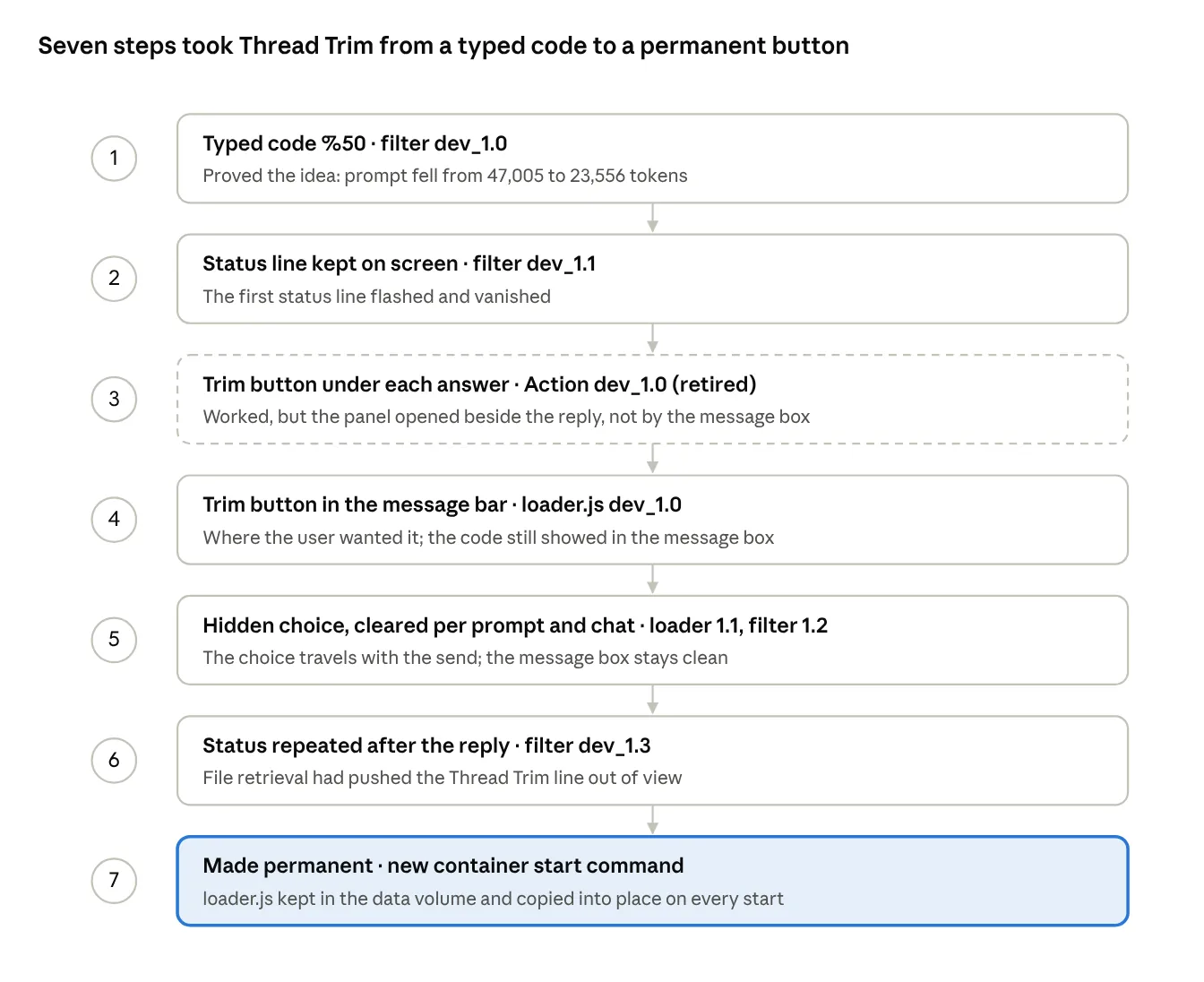
The filter was the right core from step 1 and was only refined after that. The real work was the control: getting the choice to the right place on screen, keeping it out of the message box, and tying it to one prompt in one chat. The dashed step was built, used and then switched off once step 4 replaced it.
How it works
Architecture overview
Thread Trim has two parts that never talk directly. The page script in the browser records the choice and attaches it to the outgoing prompt; the filter on the server reads it and trims.
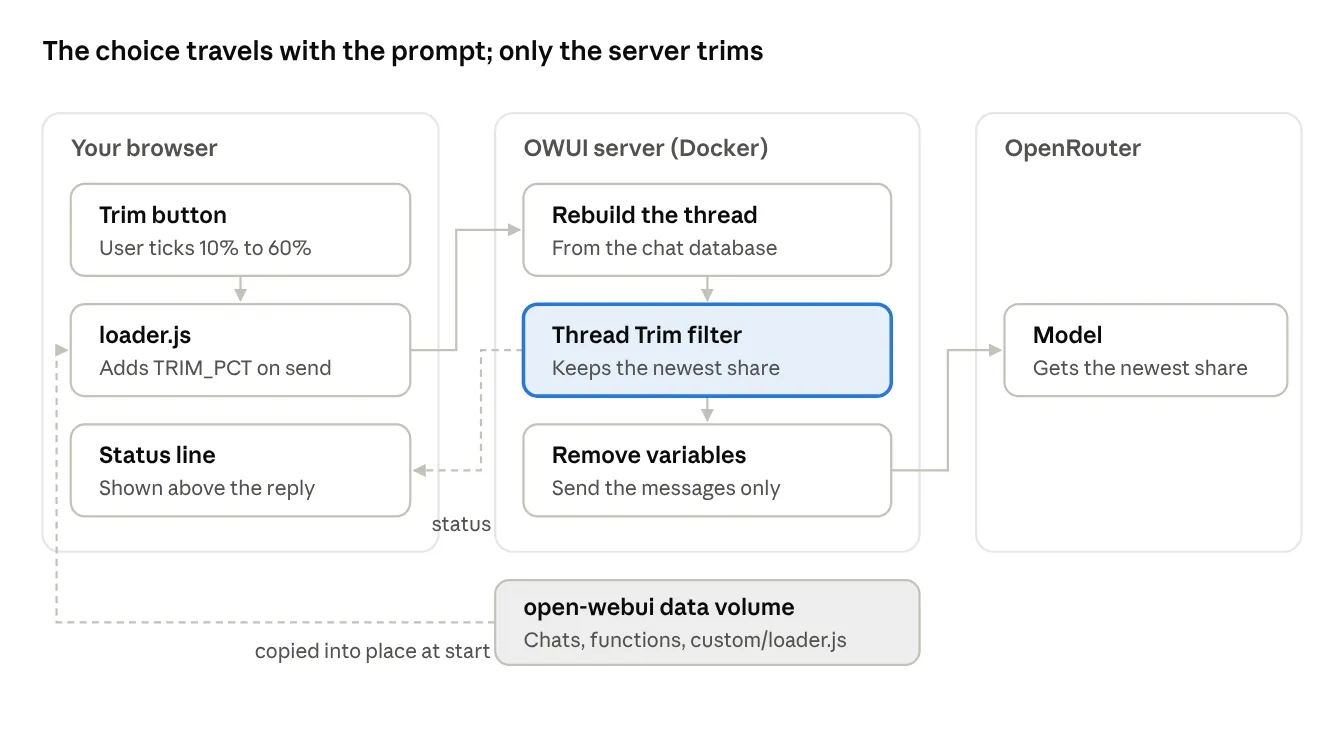
Follow the arrows from the top left. The user ticks a percentage; on send, loader.js adds it to the request as {{TRIM_PCT}}. The server rebuilds the thread from its database, the filter keeps the newest share, and OWUI removes the variables before passing the messages on. The model sees only the trimmed thread. The filter’s status line comes back to the browser (dashed). Underneath, the data volume holds the chats, the filter and the stored copy of loader.js.
This split mattered. In v0.13, the browser does not send the thread for saved chats: the server rebuilds it from the database. So trimming has to happen on the server, and the browser’s job is only to pass the choice along. OWUI’s variables bundle was the clean way to do that: it reaches filters and is stripped before the model (checked in OWUI’s main.py and middleware.py).
The filter (Thread Trim)
The filter does the trimming. It is an OWUI filter Function, installed globally, running on the server just before each request goes to OpenRouter. Current version: dev_1.3.
Where it gets the percentage. Two places, checked in this order:
- The Trim button’s setting, carried in the request’s variables bundle under the key {{TRIM_PCT}}.
- A typed code at the very start of the prompt, such as %50 followed by a space. The code is stripped before sending, so the model never sees it.
If both are present, the larger wins. Values outside 1 to 100 are ignored. A typo such as %5O or %30hi is ignored too, so a slip sends the whole thread rather than cutting it short.
How it cuts.
- System messages always go, wherever they sit.
- The latest prompt always goes.
- Of the earlier messages, it keeps the newest share, rounded up by message count.
- The cut is then moved forward to the next user prompt, so no reply is sent without the question it answered. “50%” may therefore come out slightly under 50%.
Only what is sent changes. OWUI’s stored chat is untouched.
How it reports. It posts a status line such as “Thread Trim 10%: sent 6 of 51 earlier messages, skipped 45”. With no setting, it posts “sent all 51 earlier messages (100%)”; a switch in its Valves can turn that off. OWUI shows only the latest status above a reply, so file retrieval or web search could push the line out of view. The filter therefore repeats it once the reply finishes, through its outlet hook, so it is always the one on show.
Settings (Valves). Two: priority, the order among filters, and show_status_when_no_code, on by default.
The page script (loader.js)
The page script gives the user the control. It runs in the browser on every OWUI page, adds the Trim button and sends the user’s choice along with the prompt. Current version: dev_1.1.
The button. It sits in the message bar, beside the + button. It finds its place by OWUI’s own element ID for that button, input-menu-button, which is the same in v0.13.0 and v0.13.3. OWUI redraws the message bar when the user changes chat, so the script watches the page and puts the button back whenever it disappears.
The panel. A click opens a small panel of tickboxes: 10%, 20%, 30%, 40%, 50% and 60%. It opens below the button if there is room, otherwise above. A click outside closes it.
- Ticking a box sets the choice. If several are ticked, the largest wins.
- Unticking all clears it, so the whole thread goes.
- The button shows the choice, for example Trim 10%, with an amber outline. With no choice, it reads Trim.
- Nothing is written into the message box.
Sending the choice. OWUI’s browser code sends each prompt to the server’s /api/chat/completions address. The script watches for that one request. If a choice is set, it adds {{TRIM_PCT}} to the request’s variables bundle, then clears the choice. The server hands variables to filters and removes it before the request goes to OpenRouter, so the model never sees it. If anything goes wrong in this step, the request goes out unchanged.
Per prompt, per chat. A choice applies to the next prompt only, then clears. It is also tied to the chat it was made in, read from the address bar. Switching to another chat clears it.
Where it lives. OWUI loads a file called loader.js on every page and ships it empty for local additions. The script is that file. Section 12 explains how it is kept and put in place.
Deployment and code
Why loader.js, and why the data volume
loader.js is OWUI’s own hook for adding a script to every page, and the data volume is the only place in Docker that survives updates and is backed up. Together they give a permanent message-bar button without a browser add-on.
Why loader.js. Every OWUI page loads /static/loader.js (line 38 of src/app.html in v0.13.0 and v0.13.3). The file ships empty, so nothing of OWUI’s is displaced. A script placed there runs on every page, which is what a button in the message bar needs. The alternatives were weaker: an Action button lives only under answers, and a script run from an Action vanishes on page reload.
The overwrite trap. On every start, OWUI clears its live static folder (/app/backend/open_webui/static) and recopies loader.js from the master copy at /app/build/static/loader.js (config.py, lines 95 to 148). A file placed in the live folder would be wiped at the next restart. So the script must replace the master copy.
Why the data volume. A Docker container is disposable: each OWUI update replaces it. Anything placed only inside the container is lost at the next update. The open-webui volume, mounted at /app/backend/data, is what survives. It already holds the chats, settings and functions, and it is what the user backs up. So the script is kept there, at /app/backend/data/custom/loader.js.
Options weighed.
| Option | Survives updates | Backed up with the volume | Effort per update |
|---|---|---|---|
| Keep it in the data volume, copy at start (chosen) | Yes | Yes | None, if the start command is kept |
| Build a custom OWUI image | Yes | No | Rebuild the image each time |
| Copy straight into the running container | No | No | Redo after every update |
| Folder on the PC, linked in | Yes | No | None; ruled out by the user’s preference |
Container start-up change
The container now starts with one extra step: it copies loader.js from the data volume into place, then runs OWUI’s normal start-up. This command replaces the old one for all future upgrades.
$key = docker exec open-webui printenv WEBUI_SECRET_KEY

docker run -d -p 3000:8080 --add-host=host.docker.internal:host-gateway -v open-webui:/app/backend/data -e WEBUI_SECRET_KEY=$key -e RAG_SYSTEM_CONTEXT=true --name open-webui --restart always ghcr.io/open-webui/open-webui:main bash -c "cp -f /app/backend/data/custom/loader.js /app/build/static/loader.js 2>/dev/null; exec bash start.sh"
What is new. Only the part from bash -c to the end. Everything before it matches the previous set-up, read from the running container with docker inspect: restart always, port 3000, the open-webui volume, the host.docker.internal link used by the Yahoo connector, and the two user settings WEBUI_SECRET_KEY and RAG_SYSTEM_CONTEXT=true.
What the new part does.
- cp -f … copies the stored script over OWUI’s empty master copy.
- 2>/dev/null; means a missing file is not an error: the copy fails quietly and start-up carries on.
- exec bash start.sh runs OWUI’s own start script, the image’s default command (Dockerfile line 236).
So the worst case is OWUI without the button. It cannot stop OWUI from starting.
Getting the key. The first line copies the secret key out of the running container into PowerShell’s memory, so it never appears on screen. A copy saved on 5 November is in C:UsersR3webui_secret_key.txt. A wrong key would only force a fresh login.
Changing the script later. Copy the new file into the volume, copy it into place, restart and reload the page:
docker cp D:DOWNLOADSloader.js open-webui:/app/backend/data/custom/loader.js
docker exec open-webui cp /app/backend/data/custom/loader.js /app/build/static/loader.js
docker restart open-webui
Then press Ctrl+F5 in the browser, so it does not use a cached copy.
Key code snippets
Four short extracts carry the logic. The full files are thread_trim_filter_dev1.3.py (197 lines) and loader.js dev_1.1 (199 lines), held separately.
1. The filter reads the button’s setting (Python). The setting arrives in OWUI’s __metadata__, under variables. Anything unreadable is ignored, so the whole thread goes.
raw = ((__metadata__ or {}).get("variables") or {}).get("{{TRIM_PCT}}")
if raw is not None:
n = int(str(raw).strip())
if 1 <= n <= 100:
button_pct = n
if button_pct is not None:
pct = button_pct if pct is None else max(pct, button_pct) # largest wins
2. The filter makes the cut (Python). It counts back from the newest message, then moves the cut forward to the next user prompt, so no reply is sent without its question.
keep_target = math.ceil(total * pct / 100)
start_pos = total - keep_target
while start_pos < total and messages[history_idx[start_pos]].get("role") != "user":
start_pos += 1
new_messages = [m for i, m in enumerate(messages)
if m.get("role") == "system" or i in keep or i >= last_user]
3. The filter repeats its status after the reply (Python). The inlet stores the line under the chat and message IDs; the outlet sends it again, so it ends up last.
async def outlet(self, body, __event_emitter__=None, __metadata__=None):
key = _key(__metadata__)
text = _PENDING.pop(key, None) if key else None
if text and __event_emitter__:
await __event_emitter__({"type": "status",
"data": {"description": text, "done": True, "hidden": False}})
return body
4. loader.js adds the choice to the outgoing prompt (JavaScript). It watches for the one request that sends a prompt, adds the setting to variables and clears the choice. Any error sends the request unchanged.
window.fetch = function (input, init) {
try {
const url = typeof input === 'string' ? input : (input && input.url) || '';
const pct = activePct(); // only if set in this chat
if (pct && //api/chat/completions(?|$)/.test(url) && typeof init.body === 'string') {
const body = JSON.parse(init.body);
body.variables = Object.assign({}, body.variables || {}, { '{{TRIM_PCT}}': String(pct) });
init = Object.assign({}, init, { body: JSON.stringify(body) });
setChoice(null); // one prompt only
}
} catch (e) { /* send unchanged */ }
return realFetch(input, init);
};
The extracts are trimmed for reading. Snippet 4, for example, omits the check that the request is a POST.
Verification against source code
Every design-critical fact about OWUI was checked in its own source code on GitHub, at tags v0.13.0 and v0.13.3, before being built on. The user’s server ran v0.13.0 at the time.
| OWUI file | What it confirmed | Used for |
|---|---|---|
| src/app.html (line 38) | Every page loads /static/loader.js | The button’s home |
| static/static/loader.js | Ships empty (0 bytes) | Safe to replace |
| backend/open_webui/config.py (lines 95 to 148) | On start, the live static folder is cleared and refilled from /app/build/static | Target the master copy |
| Dockerfile (lines 213 and 236) | Front end copied to /app/build; default command bash start.sh | Start command and copy path |
| src/lib/components/chat/MessageInput.svelte | The + button has the ID input-menu-button, in the left group of the bar | Button placement |
| src/lib/components/chat/Chat.svelte (lines 4516 to 4672) | Saved chats send no thread from the browser; the request carries variables | Server-side trimming; how to pass the choice |
| src/lib/apis/openai/index.ts | Prompts go to /api/chat/completions via fetch | Where the script attaches the choice |
| src/lib/utils/index.ts | Variable keys use the {{NAME}} form | Naming {{TRIM_PCT}} |
| backend/open_webui/main.py (line 1329) | variables passed into filter metadata | Filter reads the setting |
| backend/open_webui/utils/middleware.py (lines 2322, 3897 to 4020) | variables removed before the model; outlet filters run inline with the same metadata | Model never sees it; status repeat |
| …/ResponseMessage/StatusHistory.svelte | Only the latest status shows; the rest sit in a collapsible list | Why the line vanished; the outlet fix |
The OWUI docs confirmed the rest: OWUI does not auto-truncate, Context Compaction is off by default, and filters can be made switchable (context window, filter functions).
One gap remains. Line numbers come from v0.13.3. The same anchors were confirmed in v0.13.0 for app.html and MessageInput.svelte only; the others were not diffed between the two tags.
Proof and evidence
Testing
Every version was tested twice: first in simulation before release, then live in the user’s OWUI with real Gemini 4 Argon calls. One simulated test caught a dangerous flaw before it reached the user.
Simulated tests (before release). The filter ran in Python against a mock thread of 100 earlier messages. The page script ran in a simulated browser page (jsdom) with a mock OWUI message bar.
| Case | Expected | Result |
|---|---|---|
| %50 typed | Newest 50 of 100 sent, code removed | Pass |
| %20 %60 typed | Largest wins: 60 sent | Pass |
| No code, no button | All 100 sent | Pass |
| %5O typo | Ignored; all sent | Failed in dev_1.0 (read as 5%); fixed before release |
| %30hi (no space) | Ignored; all sent | Pass after the same fix |
| Button 10% | 10 of 100 sent | Pass |
| Button 60% and typed %20 | Largest wins: 60 sent | Pass |
| Button set to nonsense (abc) | Ignored; all sent | Pass |
| Status after another status | Thread Trim line ends last | Pass |
| Button placed in the bar | Inside the + button’s group | Pass |
| Tick 20% then 40% | Button reads Trim 40%; message box untouched | Pass |
| Send with 40% set | {{TRIM_PCT}}: 40 added; button resets | Pass |
| Second send | Request unchanged | Pass |
| Switch chat with 10% set | Choice cleared | Pass |
The %5O case mattered. Without the fix, a slip of the finger would have sent 5% of the thread without warning.
Live tests (in OWUI).
- Typed %50 in a long thread: prompt tokens halved in the OpenRouter log.
- The Action button under each answer: the panel opened beside the reply, so it was replaced.
- Message-bar button, loader.js dev_1.0: appeared beside +; ticking put the code in the box.
- loader.js dev_1.1 with filter dev_1.2: 10% sent 6 of 51 earlier messages; box stayed clean.
- Filter dev_1.3: the status line stayed on show after file retrieval.
- After the container was rebuilt: button present, chats intact, 30% sent 16 of 55.
One deployment slip. During the rebuild, the parked old container and the new one were both removed by mistake. No data was lost: removing a container never deletes the open-webui volume. A fresh container was started with the new command, and everything returned. The episode confirmed that the volume, not the container, holds what matters.
Results
Every trimmed call cost less and started sooner than the full-thread call. At 10%, the prompt fell from 47,005 to 6,215 tokens, and the cost per call from $0.199 to about $0.04 to $0.05.
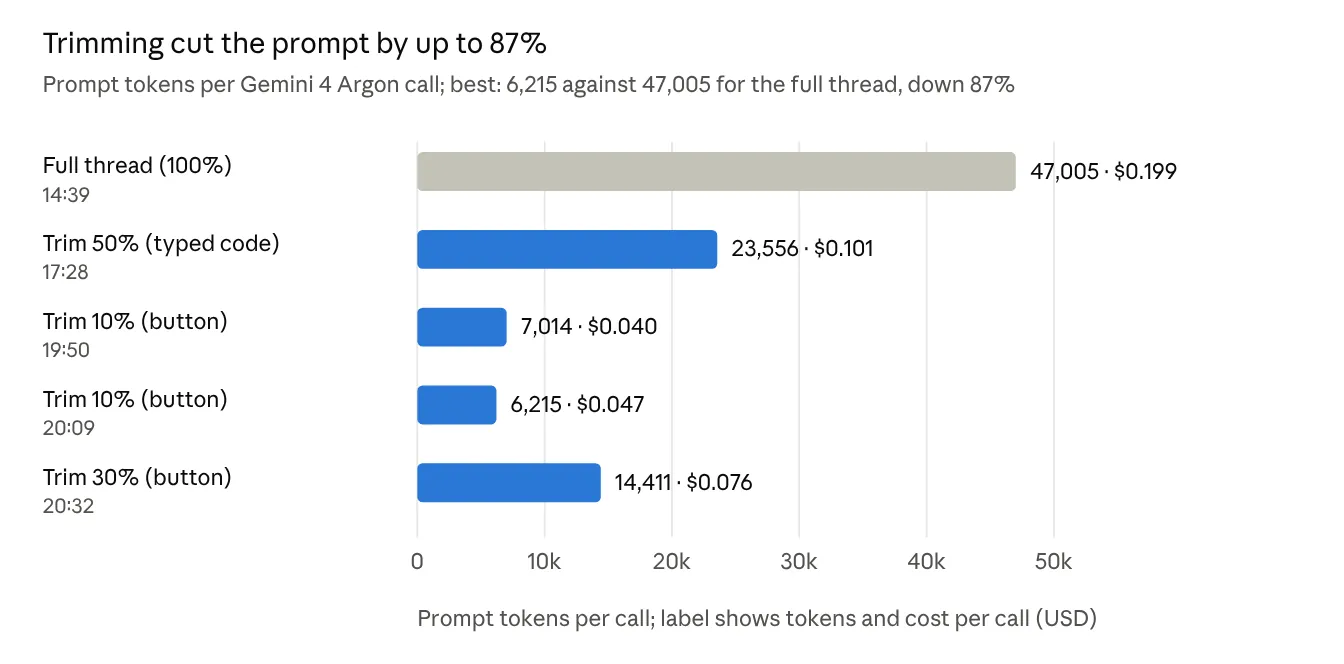
The saving is understated. The full-thread call was made at 14:39; the thread kept growing afterwards, so a full send at 20:00 would have been larger still.
Timings and messages sent.
| Call | Earlier messages sent | First words after | Whole reply |
|---|---|---|---|
| 14:39, full thread | All | 18.4 s | 46.2 s |
| 17:28, 50% (typed) | Not recorded | 5.5 s | 19.2 s |
| 19:50, 10% | 6 of 51 | 5.5 s | 19.3 s |
| 20:09, 10% | 6 of 53 | 6.7 s | 28.3 s |
| 20:32, 30% | 16 of 55 | 5.4 s | 21.2 s |
First words came about three times sooner on every trimmed call. Whole-reply times also fell, though they depend partly on how long each answer was.
Quality. No loss of context was noticed on any trimmed call. Each prompt was about the recent part of the thread, so the earlier material was not needed. This is the user’s judgement, not a measured test.
Sources: the user’s OpenRouter activity exports (openrouter_activity_2026-11-10, parts 2 to 6) and the OWUI status lines in his screenshots.
Prior-art search
Web searches did not bring up any tool with all the key features of Thread Trim. Related tools exist, but each lacks most of the combination.
| Tool | What it does | How Thread Trim differs |
|---|---|---|
| mux (Coder): /truncate 50 | Permanently deletes a percentage of the oldest messages; typed command | Deletes nothing; a button, not a command; the next prompt can send everything again |
| OWUI context clip filter | Always keeps the latest messages and the system prompt | A fixed rule for every prompt |
| Context Length Filter (tokens & turns), OWUI community, 2024 | Caps every request by turns or tokens | A fixed rule; no per-prompt choice |
| Geekflare chat settings | Context limit of 0 to 50 previous messages | A standing setting, not chosen at send |
| TypingMind | Option to send n previous messages | A standing setting |
| chatgpt-web fork (zjai-web) | History on or off per conversation | All or nothing; no proportion |
| OWUI Context Compaction | Summarises older messages past a threshold | Automatic; summaries can miss things; hidden from the user |
The combination not found elsewhere:
- a percentage of the thread, chosen per prompt;
- set from a button in the message bar, with nothing typed;
- tied to one chat and cleared after sending or on leaving;
- nothing deleted from the thread;
- confirmed on screen under every reply.
Limits of the search. Four web searches and one page read, on 10 November 2026. The OWUI community function catalogue was not browsed in full, and GitHub code was not searched. A similar private or unpublished tool cannot be ruled out. A deeper sweep would take about five more searches.
Running it and looking ahead
Known limits and risks
No risk found can stop OWUI working or lose data. The worst outcomes are a missing button or a whole thread sent, and both show on screen.
| Risk | Likelihood | How it shows | Fallback or fix |
|---|---|---|---|
| An OWUI update changes the message bar’s layout or the + button’s ID | Medium, over time | No Trim button | Type %50 and so on; update loader.js |
| An update changes how prompts are sent or how variables reach filters | Low to medium | Status line says “sent all” despite a tick | Typed code still works; recheck the source |
| The start command is forgotten at the next upgrade | Medium | No button after the upgrade | Rerun with the command in Batch D |
| Something important sat in the trimmed part | Depends on the user’s choice | The model answers confidently without it | The user’s call by design; resend at a higher share |
| Cache savings lost | Likely on providers that cache | Cached tokens fall to zero | Accepted: the cut far outweighs the lost cache |
| Knowledge and retrieved files are sent regardless | Certain | Prompt tokens higher than the message share suggests | By design: OWUI adds them after the filter runs, or in the system message, so Trim covers the conversation only |
| Several models in one chat | Untested | Unknown | Test before relying on it |
On caching. Caching only works when the start of the prompt stays the same between calls. Trimming moves the start on every turn, so a provider’s cache will rarely hit. On this thread, caching had worked on only one call in 18, so little was lost.
What is not covered. Background task calls (titles, tags) are made by OWUI separately and are not trimmed. They are small and go to a cheap task model.
Operations
Five routine jobs, each a few commands. Run PowerShell commands one at a time, copying only the command line.
Using it.
- Click Trim in the message bar and tick a percentage. The button shows it, for example Trim 30%.
- Type and send the prompt. The choice applies to this prompt only.
- Read the status line above the reply, for example “Thread Trim 30%: sent 16 of 55 earlier messages”.
- If the button is ever missing, start the prompt with %30 and a space instead.
Upgrading OWUI. Follow the usual method: back up the volume, tag the old image for rollback and pull the new one. Then start the container with the command in Batch D (Container start-up change). The part from bash -c to the end must be kept, or the button disappears. Afterwards, check that the button is there and that a 10% send shows its status line.
Changing loader.js.
- Save the new file to D:DOWNLOADSloader.js. Check Windows has not renamed it loader (1).js.
- docker cp D:DOWNLOADSloader.js open-webui:/app/backend/data/custom/loader.js
- docker exec open-webui cp /app/backend/data/custom/loader.js /app/build/static/loader.js
- docker restart open-webui, wait about 30 seconds, then press Ctrl+F5.
Changing the filter. In Admin Panel > Functions, open Thread Trim, replace all its code and click Save. No restart is needed. Update the existing function rather than adding a second one, or each prompt gets two status lines.
Rolling back or switching off.
- Filter: switch Thread Trim off in Admin Panel > Functions. The button then has no effect, and every prompt sends the whole thread.
- Button: run docker exec open-webui rm /app/backend/data/custom/loader.js, then restart. The copy step fails quietly and OWUI starts without the button.
- Container change: when recreating a container, rename and park the old one instead of removing it (docker rename, then docker update –restart=no), so it can be restored. Remove neither until the new one is confirmed working.
Future ideas
None of these is planned; each was raised during the build and left for later. All would keep the design principles: the user decides, nothing is hidden, nothing is deleted.
- Token-based shares. Trim by share of tokens rather than messages. Replies are much longer than prompts, so this would track cost more closely. Messages were chosen for being simple and predictable.
- A cost estimate before sending. Show the approximate token count and cost for the ticked share before the prompt goes.
- More choices. Add 5%, 70% or 80%, or a custom figure, if the six standard choices prove too coarse.
- A “from here” marker. Let the user pick a message in the thread and send everything from that point on. This would match drifting threads even more closely than a percentage.
- Hold the choice for a chat. An option to keep a percentage set for several prompts in one chat, for long sessions at a steady share.
- Test with several models in one chat. Confirm the trim applies to each model’s request.
- Deeper prior-art check. About five more searches, including GitHub code and the full OWUI community catalogue.
Version history
Eight releases on 10 November 2026, newest first. Two are in service: filter dev_1.3 and loader.js dev_1.1, started by the new container command.
| Order | Part | Version | Change | Status |
|---|---|---|---|---|
| 8 | Container | Start command | Copies loader.js from the data volume into place on every start | In service |
| 7 | Filter | dev_1.3 | Repeats its status line after the reply, so it stays on show | In service |
| 6 | Filter | dev_1.2 | Reads the button’s setting from {{TRIM_PCT}}; largest of button and typed code wins | Replaced by dev_1.3 |
| 5 | Page script | loader.js dev_1.1 | Choice held by the button, sent hidden; cleared after sending and on changing chat | In service |
| 4 | Page script | loader.js dev_1.0 | Trim button in the message bar; put the code in the message box | Replaced by dev_1.1 |
| 3 | Action | Trim dev_1.0 | Button under each answer; panel of tickboxes | Retired |
| 2 | Filter | dev_1.1 | Status line set to stay visible (hidden: False) | Replaced by dev_1.2 |
| 1 | Filter | dev_1.0 | Typed %N code trims to the newest N% of messages; typo guard added before release | Replaced by dev_1.1 |
All versions are held as files from this session. Only the current two need keeping for a rebuild; the older ones document the path.


The £15 Anthropic Fuel Plan: complete with digital range anxiety
Captain Walker