







Estimated reading time at 200 wpm: 18 minutes
This is an advanced guide for people who on Windows 11 have setup OpenWebUI on Docker and have configured API settings to various AI models. Why this? The powerhouse models like DeepSeek V4 Pro, Kimi K3 and GLM (now at 5.3) – all coming out of China – have been increasing their rates for API usage. This is in contrast to ‘Western’ providers of traditional models who have been slashing prices in recent months.
Whether or not you agree our Fat Disclaimer applies
So it makes sense to pay attention to how tokens are used – what you’re really paying for – unless of course one couldn’t care less about cost. But it’s not just about cost. It is about efficient use of the models for greater focus and clarity. This is not a tutorial, so rich details of the backend of OpenWebUI will not be provided at each stage. The points of ‘incision’ for models, can be found via Workspace, then editing the model(s). See also: 1) Switch, Don’t Settle: Three-in-one Analysis with Layered AI, 2) Accessing DeepSeek V4-Pro via API on Windows 11 Using OpenWebUI
Do not attempt anything here unless you really know what you are doing.
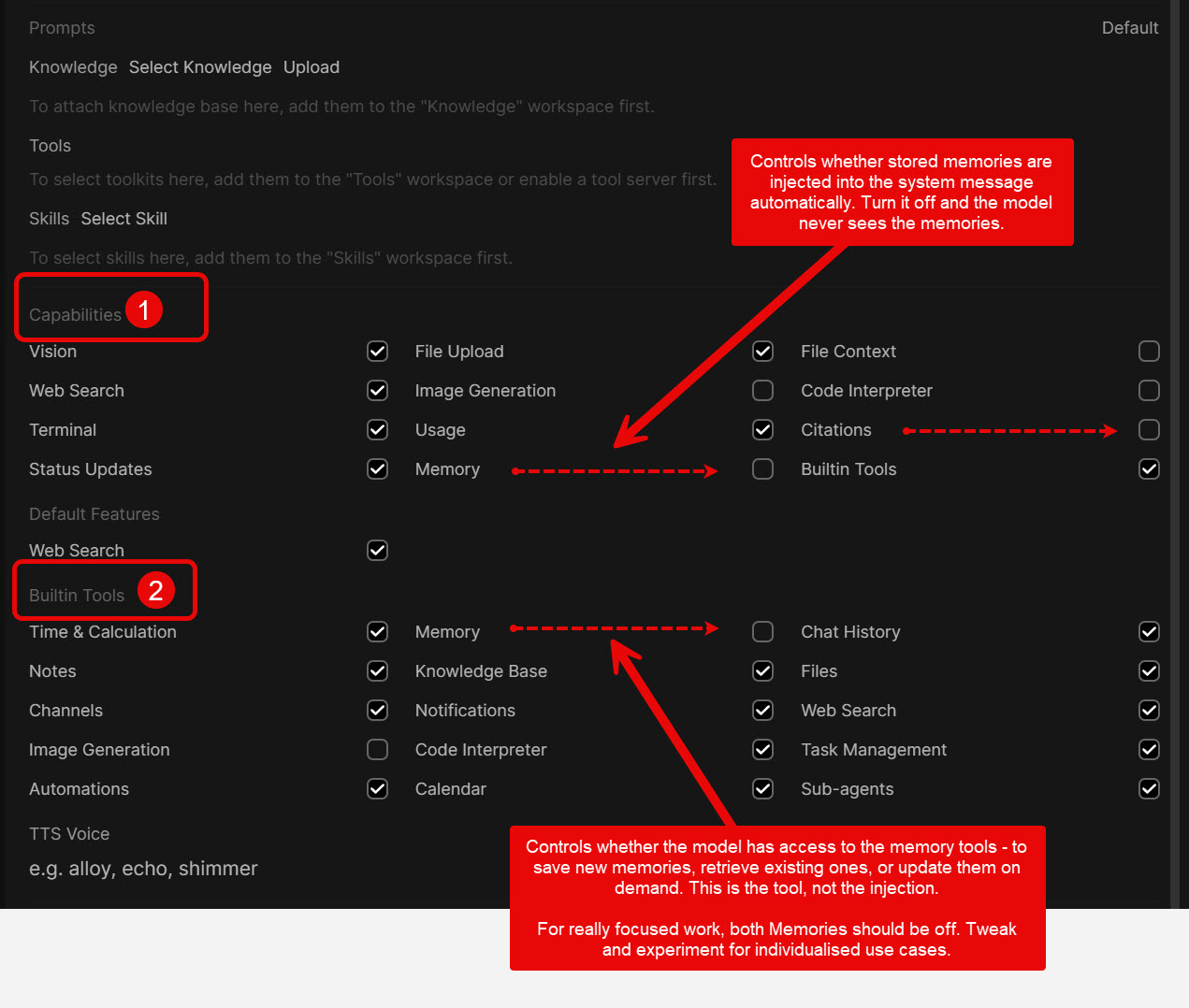
What File Context Does
When File Context is enabled on a model, OpenWebUI automatically retrieves chunks of text from any attached files or knowledge bases and injects them directly into the user’s message before the model sees it. This happens on every single turn of the conversation, regardless of whether the model needs the information.
None of this is visible to the user. The injection occurs behind the scenes. The model receives the user’s message with retrieved chunks already embedded in it, as though the user typed them.
Why This Is a Problem
1. Cache Invalidation
LLM providers — Z.AI, Anthropic, OpenAI, DeepSeek — cache the beginning of each request (the “prefix”). When two consecutive requests share an identical opening sequence of tokens, the provider serves the shared portion from cache rather than reprocessing it. Cached input tokens are dramatically cheaper. On Z.AI, for instance, cached input costs $0.26 per million tokens compared to $1.40 for fresh input — an 80% reduction.
A conversation naturally grows by appending new turns at the end, which is inherently cache-friendly. The prefix — the system prompt plus all previous turns — stays the same. Only the newest message is new.
File Context breaks this. Because OpenWebUI injects different retrieved chunks on every turn, the content of earlier messages changes. The provider sees a different prefix. The entire cache is invalidated. Every token in the conversation is reprocessed at full price, every turn.
In a long analytical session — say twenty turns discussing a large PDF — this means paying for the full context twenty times over, rather than paying once for the stable prefix and only processing the new tail each time.
2. Unnecessary Token Consumption
File Context retrieves and injects chunks on every turn, whether the model needs them or not. A clarifying question about something already discussed? Chunks injected. A request to reformat the last answer? Chunks injected. These are wasted tokens billed at full input rate.
3. Poor Retrieval Quality
With File Context on, OpenWebUI chooses which chunks to retrieve using semantic similarity to the query. The user has no control over what is selected. It sometimes pulls irrelevant chunks or misses the relevant ones, because the retrieval is blind to the user’s actual analytical intent.
What Happens When File Context Is Off
Turning File Context off does not remove file access. It changes the mechanism.
With File Context off and Builtin Tools on, the model receives metadata about attached files — names, sizes, types, IDs — but no content. When the model judges it needs to read the file, it calls tools such as list_chat_files, query_chat_files, grep_chat_files, or view_file. The content comes back as a tool result appended at the end of the conversation.
This matters for three reasons:
- The prefix stays stable. Tool results append at the end. Nothing earlier gets rewritten. The cache holds.
- Retrieval is on demand. The model only fetches what it needs, when it needs it. No wasted tokens on unnecessary chunks.
- Retrieval is intentional. The model can make multiple targeted calls — search broadly first, then read a specific section. This typically produces better results for deep analytical work than automatic chunk injection.
The Required Settings
The settings sit in Settings → Admin → AI → Models, then click the pencil icon on each model individually. These are per-model settings. Changing one model does not affect others.
Under Capabilities, the correct configuration for cache-optimised operation is:
- File Upload — On
- File Context — Off
- Citations — Off (see the dedicated section below)
- Builtin Tools — On
Under Advanced Params: Function Calling — must be set to Native (builtin tools do not work in Legacy mode)
Under Builtin Tools, leave the Files category enabled.
A Critical Note on Accuracy
The File Upload and File Context checkboxes sit directly beside each other. They are easy to confuse. Getting them the wrong way round — File Upload off, File Context on — breaks file uploads entirely, producing a “Model(s) do not support file upload” error.
More importantly, the JSON Preview at the bottom of the model edit page is the only reliable way to confirm what was actually saved. The UI checkboxes can display a state that does not match the stored configuration. After making any changes, always scroll down, click “Show” on JSON Preview, and verify that the values under capabilities match what was intended. This is not theoretical — the mismatch has been observed in practice, where checkboxes showed one state while the underlying JSON stored the opposite.
Citations and Why They Must Be Off
Where the Setting Lives
The Citations checkbox sits under Capabilities in the model edit page. It is a per-model setting. After changing it, always verify it saved correctly by checking the JSON Preview — the checkbox display has been known to disagree with the stored value.
What Citations Does When It Is On
When Citations is enabled, OpenWebUI does not simply pass messages and replies back and forth. It intervenes after every tool-calling round.
Here is the sequence with Citations on:
- The user sends a message.
- The model calls a tool — say,
query_chat_filesto read part of an uploaded document. - The tool returns its result.
- Before the model generates its answer, OpenWebUI steps in. It rewrites the system message to include a growing list of sources. It also rewrites the last user message to embed citation instructions and accumulated source references.
- The model then generates its response based on this rewritten context.
If the model makes multiple tool calls in a single turn — which is normal in agentic workflows — steps 3 and 4 repeat each time. The system message and last user message are rewritten after every single tool round.
Why This Destroys the Cache
Prompt caching works by recognising that the beginning of a request is identical to a previous request. The provider stores the processed version and reuses it, charging a fraction of the full price.
Citations rewrites the system message. The system message is the very first thing in the prefix. When it changes, the entire prefix is invalidated. Nothing is served from cache. Every token in the conversation is reprocessed at full input price.
This is not a one-off cost. In an agentic setup, the model may call three or four tools in a single turn. Each tool round triggers a rewrite. Each rewrite invalidates the cache. On a conversation that has grown to tens of thousands of tokens, full price is being paid on all of them multiple times within a single turn.
Over a long analytical session, this is the most expensive setting to leave on by accident.
What Is Lost by Turning It Off
Very little. The Citations feature formats source references in a specific way in the UI — clickable links back to the source chunks. With Citations off, that UI formatting disappears.
The ability to get cited responses does not disappear. The model still receives source information in the tool results. If the system prompt instructs the model to cite its sources — document name, page number, paragraph — it will do so in the text of its answer. The same information appears as text in the response rather than as formatted UI elements.
The Workaround
Move citation instructions into the static system prompt. For example, a document analysis model might include:
“Cite every claim with the document name, page number, and paragraph number where available.”
That instruction is part of the cached prefix. It never changes. The model follows it using the source information from tool results. No rewriting, no cache invalidation, no extra cost.
Summary
Citations on: system message rewritten after every tool round, cache destroyed repeatedly within a single turn, full-price billing on all tokens every time.
Citations off with citation rules in the system prompt: system message stays stable, cache holds, citations still appear in the model’s text output.
Memory Injection (the “Memory” Checkbox)
What This Refers To
“Memory Injection” is not a labelled feature in OpenWebUI. It is the behaviour produced by the Memory checkbox under Capabilities in the model edit page — the same Capabilities section where File Upload, File Context, and Citations sit.
There is also a global Memory toggle under Settings → Personalisation → Memory. That controls whether the memory system as a whole is active. The per-model Memory checkbox under Capabilities controls whether a specific model receives injected memories.
What Memories Are
OpenWebUI maintains a list of facts about the user that persist across conversations. These are stored under Settings → Personalisation → Memory. They can be added manually, or models can create them during conversation if the Memory capability is enabled.
Examples might include language preferences, writing style descriptions, project details, technical configurations, or ongoing work matters.
How Injection Works
When a conversation starts with a model that has Memory ticked on, OpenWebUI takes every stored memory and writes them into the system message. This happens before the model sees anything else. The model receives the memories as though they were part of its core instructions.
This injection happens on every request — every turn of the conversation. The full set of memories is included every time.
Why This Matters for Cache
If memories do not change during a conversation, the injected block is identical on every turn. The system message stays the same. The cache holds. No extra cost.
If a memory is added, edited, or deleted mid-conversation — manually, or by the model itself saving a new fact — the system message changes. The prefix is invalidated. The cache breaks. Full price is paid on all tokens for that turn and every subsequent turn until the memories stabilise again.
In practice, memories rarely change during a single conversation. So the cache cost is usually not the main concern with this setting.
The Real Problem: Contamination
The more serious issue is content contamination. Every model with Memory on receives all stored memories. There is no way to assign specific memories to specific models. It is all or nothing.
This creates problems for specialist workspace models. Consider a model built specifically for independent document analysis — for example, a workspace model called DocAnalysis, built on DeepSeek V4 Pro. Its system prompt might instruct it to work only from the documents provided, to avoid drawing on external knowledge, and not to import material from other projects.
But if Memory is on, the model receives all stored memories in the system message before it sees the system prompt. Those memories might include details of unrelated projects, writing style conventions, ongoing case matters, or technical configurations. The model now has two competing sets of instructions: the memories telling it about unrelated work, and the system prompt telling it to ignore everything except the document.
At best, the system prompt wins and the memories are ignored. At worst, the model subtly draws on injected context — applying writing conventions from a fiction project to a public inquiry report, or connecting names that appear in both the document and a stored memory about an unrelated matter.
The Fix
Turn Memory off in the Capabilities section of any workspace model that should operate in isolation. The JSON should confirm "memory": false. The model will then analyse documents without injected personal context.
General-purpose models where personalisation is wanted can keep Memory on. This creates the correct split: models that need to know about the user get memories; models that must work from documents alone do not.
The Environment Variable Alternative
For a more aggressive approach across all models, the environment variable ENABLE_MEMORY_SYSTEM_CONTEXT=false can be set in the OpenWebUI deployment configuration. This stops all automatic memory injection for every model. Models would then retrieve memories on demand through the Memory builtin tool — the same on-demand pattern used for files when File Context is off.
This is the most cache-optimal approach but requires a server-level configuration change. For most setups, the per-model approach — turning Memory off only on specialist models — is simpler and sufficient.
Where to Check
- Stored memories: Settings → Personalisation → Memory. Review what is stored. Remove anything outdated or unnecessary. Each memory adds tokens to every system message on every turn of every conversation with every model that has Memory on.
- Per-model Memory capability: Settings → Admin → AI → Models → pencil icon → Capabilities → Memory checkbox. Verify in the JSON Preview that
"memory"matches what the checkbox shows. - Workspace model Memory capability: Workspace → Models → pencil icon → Capabilities → Memory checkbox. Same JSON Preview check applies.
Full Context vs Focused Retrieval
OpenWebUI has two separate controls that affect how document content reaches the model. They are easy to confuse because the names are similar. This involves understanding Knowledge section in Workspace. A ‘Knowledge’ is a collection of files that can be attached to various discussions. The following teases apart concepts.
1. Model-level File Context (Capabilities)
This is the checkbox in the model editor under Capabilities. It is the main setting discussed throughout this article.
- On: OpenWebUI automatically retrieves and injects content from attached files or knowledge bases on every turn.
- Off: No automatic injection occurs. The model receives only metadata and must use tools if it needs the content.
Turning this off is the primary recommendation for cache-friendly, lower-cost operation.
2. Per-item Full Context / Focused Retrieval
This is a different setting. It belongs to an individual knowledge collection or file after it has been attached to a model (or appears in a chat).
Where to find it
The toggle does not appear in the Knowledge workspace itself (the place where you manage collections and only see Rename / Download / Delete).
It only appears once the collection or file is attached:
- Attach the Knowledge collection (or file) to the model, or attach it in a chat.
- Click on the attached item.
- A switch labelled “Using Focused Retrieval” (or similar) becomes visible, normally as the default.
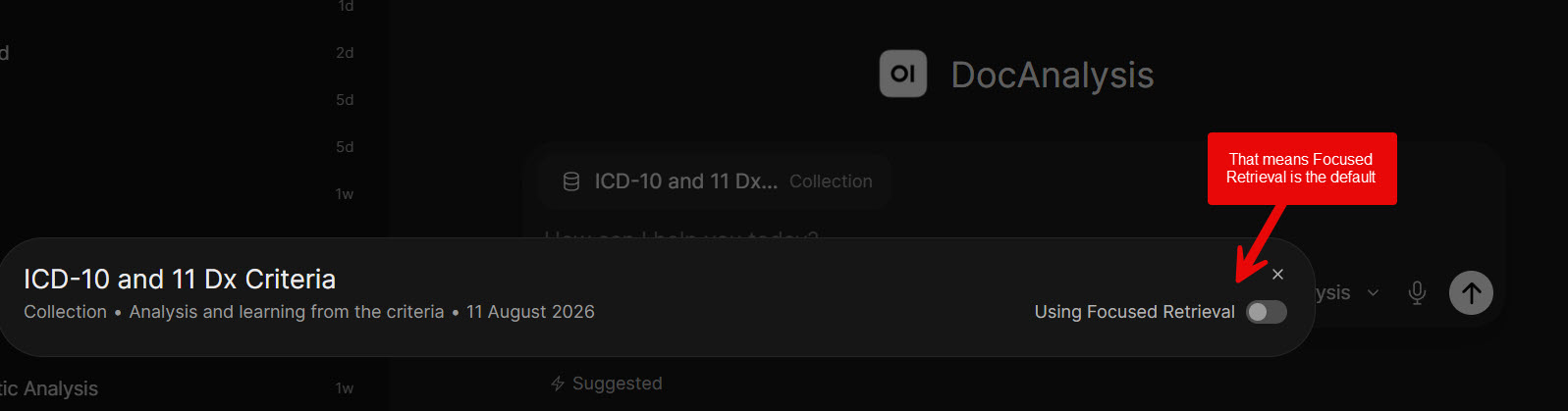
What the two modes do
| Mode | Behaviour | Effect on every turn |
|---|---|---|
| Focused Retrieval (default) | Uses RAG to inject only the most relevant chunks | Still injects content, but less than the whole document |
| Full Context | Injects the entire content of the item | Full document text is added on every single turn |
Full Context therefore places the complete text into the request repeatedly. This continuously changes the prompt prefix and prevents effective prompt caching. On a project with several files in the attacked Knowledge, the cost multiplies quickly.
Practical guidance
- Full Context is reasonable only for intense work on one (or at most two) relatively short files where you genuinely need the model to see every word on every turn.
- For several chapters, longer documents, or extended analytical sessions, leave the item on Focused Retrieval and keep the model-level File Context capability off. Let the model fetch what it needs through tools. This keeps the prompt prefix stable and allows caching to work.
The two settings are independent. Turning the model-level File Context capability off does not automatically change any item that has already been set to Full Context. Always check the per-item toggle after attaching knowledge.
The Practical Workflow After These Changes
When a PDF is uploaded for discussion, the sequence is now:
- OpenWebUI processes the file — extracts text, chunks it, stores the chunks.
- The model receives metadata only: filename, size, type, ID.
- The user asks a question. The model calls
query_chat_filesorview_fileto fetch what it needs. - The content comes back as a tool result appended at the end.
- On subsequent turns, the system prompt and all previous turns remain cached. Only the new message and any new tool results are processed at full rate.
- Full context (which is not File Context), is for Knowledge files attached. That setting will remain in Focused Retrieval most times, except where intense work is needed on one or two files.
The model decides what to fetch and when. Users may occasionally need to prompt explicitly — “check the attached document” — if the model does not automatically recognise that it should look at the file. But for analytical work, the quality of retrieval is typically the same or better, because the model makes targeted, intentional decisions about what to read.
The Potential Savings
The savings come from multiple sources compounding:
Eliminated waste from File Context. No more chunks injected on turns that do not need them. In a typical analytical session with a document, several turns will be follow-ups, reformatting requests, or clarifications that never needed fresh retrieval.
Eliminated cache destruction from Citations. No more system message rewrites after every tool round. In agentic workflows with multiple tool calls per turn, this is where the most severe cost multiplication occurs.
Cache discounts on the stable prefix. On Z.AI’s pricing, cached input is $0.26/M tokens versus $1.40/M for fresh — roughly 80% cheaper. Similar ratios apply across other providers. On a twenty-turn conversation where the context grows to 50,000 tokens, the old setup reprocessed all 50,000 at full rate every turn. The new setup processes the growing prefix from cache. Only the new tail — typically a few hundred to a few thousand tokens — is billed at full rate.
The combined effect on a long analytical session with a substantial document is estimated at 60–70% cost reduction. The longer the conversation and the larger the document, the greater the saving.
Applicability Across Providers
This applies to every provider routed through OpenWebUI, not just Z.AI. Anthropic, OpenAI, DeepSeek, and any OpenAI-compatible gateway that supports prefix caching will benefit from the same configuration changes. The mechanism is identical: keep the prefix stable, let new content append at the end, and the provider’s cache does the rest.
Verifying It Works
After making these changes, the cached_tokens field in API usage data should show an increasing count as conversations grow longer. If cached tokens remain at zero or stay flat, something is still rewriting the prefix. Check the JSON Preview on each model to confirm all settings persisted correctly.
Conclusion
The configuration changes described here restore a fundamental property of modern language-model serving: a stable prompt prefix that can be cached. By disabling automatic File Context injection, turning Citations off, and keeping Memory disabled on specialist models, the system prompt and conversation history remain unchanged from turn to turn. New content—whether tool results or the user’s latest message—arrives only at the end of the request. Providers can therefore serve the bulk of each subsequent call from cache at a fraction of the normal input price. At the same time the model retains full access to attached documents through explicit tool calls, so analytical quality is preserved and often improved because retrieval becomes deliberate rather than automatic.
The secondary distinction between Focused Retrieval and Full Context further refines this control: Full Context remains available for the occasional short document that genuinely requires complete visibility on every turn, while the default Focused Retrieval mode, combined with File Context left off, keeps multi-chapter or long-document sessions economical.
Taken together these adjustments convert an expensive, cache-hostile workflow into one that scales gracefully with conversation length and document size. The same principles apply across any provider that supports prefix caching—Z.AI, Anthropic, OpenAI, DeepSeek and others—so the savings are not platform-specific. For anyone who regularly analyses substantial documents inside OpenWebUI, the practical outcome is lower cost, faster follow-up responses, and clearer separation between models that should remain isolated and those that may usefully carry personal context. The required settings are few, the verification step via JSON Preview is straightforward, and the resulting behaviour aligns the interface with the underlying economics of contemporary language-model APIs.