



Estimated reading time at 200 wpm: 5 minutes
Executive Summary
If I didn’t know about it, I can safely say most other people don’t! I’m talking about AI mode. Then most people would then say ‘Yeah… man I use that all the time when I do a Google search’. But that’s not exactly what I’m talking about. AI Mode is separate system driven by Gemini Hydrogen and is accessible without searching from a browser search bar. It can be found at none other than Google and then hitting AI mode! It functions very must like Gemini Portal would.
Whether or not you agree our Fat Disclaimer applies
For many everyday analytical, technical, and document-centric tasks, users do not require heavy multimedia generation, video processing, or complex agentic workspaces like in the Gemini Portal. Instead, practical productivity relies on fast, accurate text reasoning, clean file parsing, and structured code or document generation without prematurely exhausting strict compute quotas.
Because Google maintains AI Mode in Google Search and the standalone Gemini Web Portal as separate architectural ecosystems, users can combine both interfaces into a deliberate, two-stage workflow. By using AI Mode as an exploratory staging environment before moving distilled context into the Gemini Portal, users can significantly reduce rate-limit friction while maximising the value of frontier reasoning models.
But note conversations in AI Mode do not appear in Gemini Portal because they are separate ecosystems. That’s not a problem. To avoid burning up quotas in Gemini Portal, much good work can be done for almost free in AI mode first. Then the trick is to get AI mode to make detailed notes in a code-fenced markdown block which will then be used in Gemini Portal.
1. Architectural Separation: Why Two Interfaces Exist
Although both platforms are powered by Google’s Gemini foundation models, they operate on distinct backend pipelines and do not share a unified chat history:
- Organisational and Infrastructure Silos: The Gemini Portal is built under Google DeepMind as a standalone productivity assistant, whereas AI Mode is engineered within Google’s Knowledge & Information (Search) division on top of live web-retrieval infrastructure.
- Divergent Commercial Models: AI Mode operates within an ad-supported Search funnel, while the Gemini Portal is positioned as an ad-free subscription and Google Workspace environment.
- Data and Compliance Boundaries: Search sessions are logged under Google Search History and intertwined with web-grounding telemetry, whereas portal conversations are stored separately under Gemini Apps Activity to isolate private Workspace artifacts and comply with regulatory firewalls.
2. Operational Boundaries of Google AI Mode
AI Mode defaults to Gemini 4 Hydrogen, a model tuned for rapid execution, low fabrication rates, and parallel web grounding (“query fan-out”). While it lacks the Gemini Portal’s side-by-side Canvas editor, custom Gems, and persistent cross-chat memory, it offers distinct advantages for baseline analytical work:
Rate Limits and Context Mechanics
- Absence of Rolling 5-Hour Compute Clocks: Unlike the Gemini Portal—which meters usage against strict 5-hour and weekly rolling quotas—standard conversational turns in AI Mode are governed by Search infrastructure rules, allowing extended back-and-forth exploration without sudden lockouts. (Note: Specialized sub-tools such as “Deep Search” remain subject to daily report caps).
- Velocity Guardrails: AI Mode enforces anti-abuse rate limits against rapid-fire automated prompting (typically ~15–20 turns per minute), requiring a normal human conversational pace.
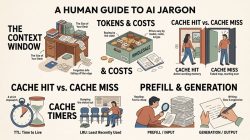
- The 32,000-Token Context Window: Standard sessions operate within a 32,000-token sliding context window (approximately 24,000 words of standard English text). This budget is shared across uploaded files, user prompts, and model responses. Once a thread exceeds this threshold, earliest context is progressively truncated.
Supported and Unsupported File Formats
AI Mode functions effectively as a lightweight document and data workbench within its 32,000-token window:
| Capability | Supported Formats & Thresholds | Unsupported Formats |
|---|---|---|
| File Uploads (Inputs) | Text-based PDFs (practical ceiling ~50 MB; optimal accuracy under ~50–100 pages), standard documents, images, and raw code/text files. | Video (.mp4, .mov), audio (.mp3, .wav), compressed archives (.zip, .7z), executables (.exe), and password-protected files. |
| File Generation (Outputs) | Downloadable office and data files (.docx, .xlsx, .pptx, .pdf, .csv), vector/diagram formats (.svg, .mermaid, .graphml), and syntax-highlighted code blocks. | Audio/video rendering, compiled binaries, archives, and native proprietary project files (.psd, .dwg, .blend). |
Technical Workaround for Custom Extensions: If the AI Mode upload picker rejects a plain-text file due to an unrecognised extension (such as
.graphml,.sql,.yaml, or.log), renaming the extension to.txtprior to upload allows the parser to read the raw contents cleanly.
3. Recommended Two-Stage Workflow
To prevent exploratory file interrogation from draining stricter quotas in the Gemini Portal, technical and analytical tasks should be split across both platforms:
Stage 1: Ingestion and Staging in AI Mode
- Upload and Interrogate: Upload compact reference documents (e.g., text-based PDFs around 256 KB / 4,000–10,000 words) or renamed
.txtschemas into AI Mode. - Iterate Freely: Conduct multi-turn Q&A, cross-reference claims against live Google Search results, draft modular Python scripts, or generate structural diagrams (
.mermaid,.graphml,.svg). - Export a Lossless State Summary: Before a session approaches the ~24,000-word sliding window limit (roughly 25–30 dense turns), instruct AI Mode to package all extracted facts, constraints, and structural outputs into a single code-fenced Markdown briefing block (or exportable
.docx/.csvartifact).
Stage 2: Deep Refinement in the Gemini Portal
- Inject High-Signal Context: Paste the distilled Markdown summary—or upload the generated
.docxbriefing—into a fresh session at://google.com. - Apply Heavy Compute: Allocate the portal’s stricter quotas exclusively to tasks requiring frontier reasoning models (such as Gemini 4 Neon or Carbon), interactive Canvas document editing, sandboxed code execution, or direct Google Workspace integration.
Conclusion
Treating Google AI Mode as a fast, unthrottled staging workbench rather than a mere search bar allows users to handle the majority of routine text, code, and document processing with minimal friction—reserving the Gemini Portal for high-leverage synthesis and final production.